How to Build a Self-Improving Agent with Busabase
Build an agent workflow in Busabase with chat decisions, linked data tables, reports and tasks. Includes SEO, email replies, and GA4/Clarity-driven product fixes.

An agent can finish an assignment and still leave you explaining the same context next week. It may write an article, summarize support tickets, or prepare customer follow-ups. The work gets done, but the next run does not know what happened afterward—or which choices mattered to you.
To build a self-improving agent with Busabase, connect three stages: Observe → Decide → Act. Observe what is happening, use AI analysis and human judgment to decide what deserves work, and turn that decision into action. The action produces new information for the next observation.
This guide follows three practical workflows: SEO content, marketing and support email replies, and product improvements driven by Google Analytics and Microsoft Clarity. Each includes the Busabase nodes, fields, and relationships needed to build it.
One goal, three stages
Start with an outcome you can recognize. For an SEO agent, that might be helping people find a useful answer to a specific product question. For a support agent, it might be resolving a recurring source of confusion.
Then connect three stages around that goal:
| Stage | Question | What happens |
|---|---|---|
| Observe | What is happening, and what needs attention? | Read data sources, requests, user feedback, and previous execution results. |
| Decide | What is worth doing, and what would good work look like? | AI presents evidence and recommendations; a person contributes judgment, priorities, and direction. |
| Act | How do we put that decision to work? | Turn the direction into tasks, update documents or data, and record the actual result. |
A report is an artifact within Decide: it makes the evidence and recommendations understandable. Review is an activity within that stage: a person can correct an assumption, refine the quality standard, reject a proposal, or change the priority. The stage ends with a usable direction, which may include a decision to wait.
Feedback travels back into Observe. It can include fresh traffic data, a user's complaint, a new request, a customer response, or the result of a completed task. This gives the loop a useful starting point even before its first action.
Here, self-improvement means using previous results and retained human judgment to improve subsequent decisions. A person learns from the evidence; the agent can use the person's recorded choices and standards on later runs. The effect of an action still needs to be observed.
Human judgment gives the loop direction
The middle stage deserves more than a checkmark. A person may decide that a topic is irrelevant, an answer lacks depth, a customer needs a different explanation, or the available evidence is too weak to act on.
Those choices express taste and judgment: what matters, what to prioritize, and what quality means for this work. AI helps the person see the situation and compare options. The person provides direction the agent can put into practice.
Record the useful part of that judgment beside the work. A one-time choice can stay on its report or action. A recurring standard can become part of the workspace Skill. A later run should read both the results and the guidance that shaped them.
For routine work, previously authorized instructions can guide execution. New decisions and changes that need human judgment remain visible for review. The owner's instructions and workspace permissions determine the execution scope.
Work through agent chat; keep the records in Busabase
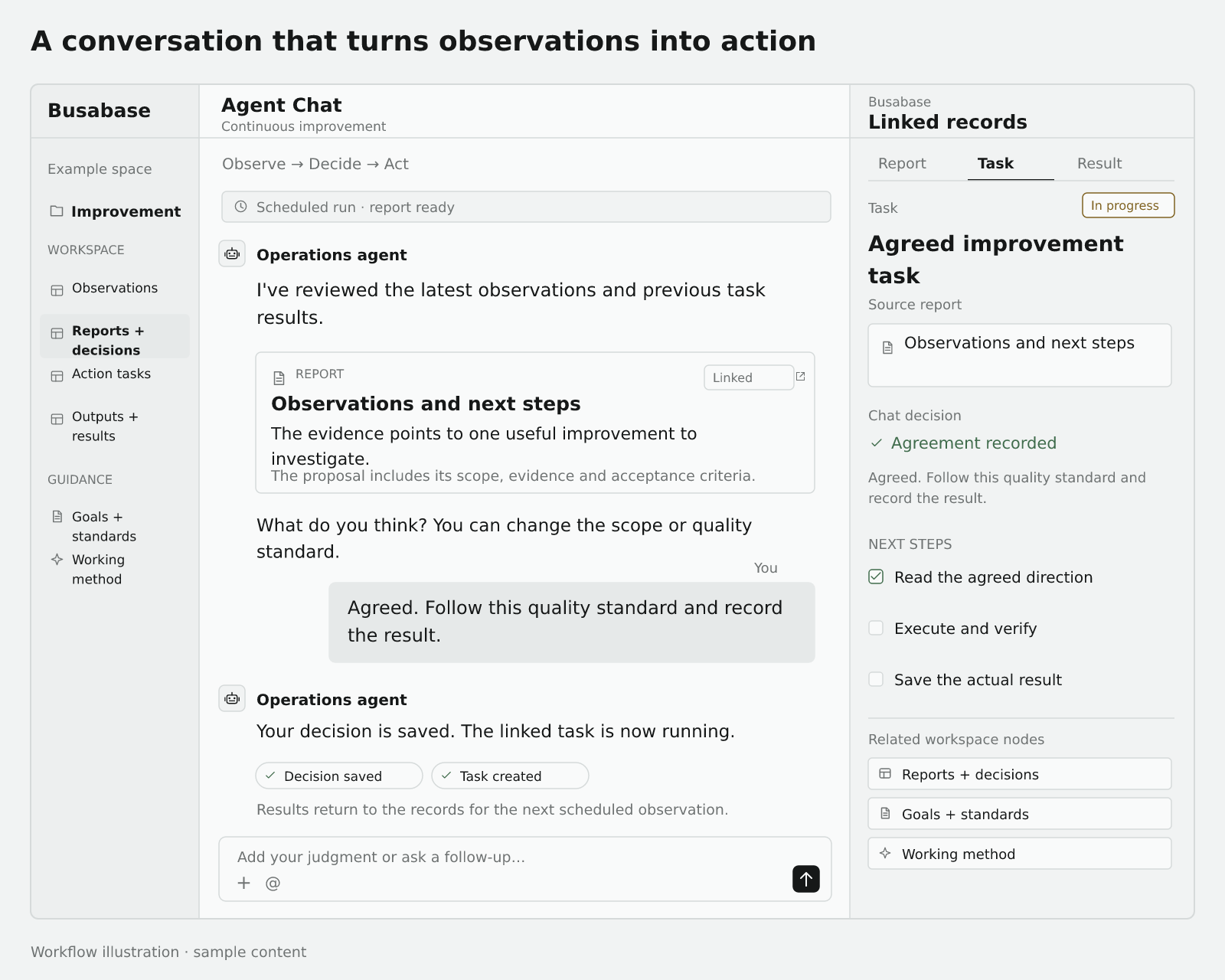
The everyday interface can be the agent chat you already use. A scheduled agent observes the latest inputs and prepares a report. In chat, the agent presents the proposal and asks what you think. You can agree, change the direction, reject it, or ask for more evidence. The chat agent records that decision and turns the agreed direction into tasks for execution.
These are roles, not a requirement to run three separate models. One agent can perform them at different times, or you can separate scheduled analysis, conversation, and execution.
The report supports Decide; your response completes the direction. Save the actual confirmation or correction with the specific proposal being discussed. The executing agent reads that record, works within the agreed scope and available tool permissions, and writes back the result. A later scheduled run reads it again.
Choose nodes by the job they hold
Start with one Folder per workflow. Use Base nodes for structured observations, reports, decisions, and tasks; Doc nodes for goals, policies, and quality standards; and Skill nodes for the instructions your agent follows.
A report table is a Base too. Give each reporting period or case its own record, put the narrative in a Markdown field, and keep evidence links, human decisions, dates, and status in separate fields. This lets an agent find the right report and a person follow its evidence from chat.
Use relation fields between tables, select fields for workflow status, dates for observation windows, and URL fields for external evidence and outputs. A chat confirmation can be saved as decision text with the proposal version, time, and conversation reference when available. The operational record captures the decision; actual writes and actions use the granted permissions.
Data arrives through the connectors, scripts, APIs, or exports you have configured. Your agent platform's scheduled task or automation runner starts each cycle. Busabase holds the shared records and their change history; creating a node alone does not connect a mailbox, an analytics provider, or a deployment system.
Example 1: turn a weekly SEO proposal into a published article
Our SEO workflow connects analytics snapshots, reports, goals, an Issue queue, and CMS content. This walkthrough simplifies the structure and uses illustrative content rather than internal screenshots or operating metrics.
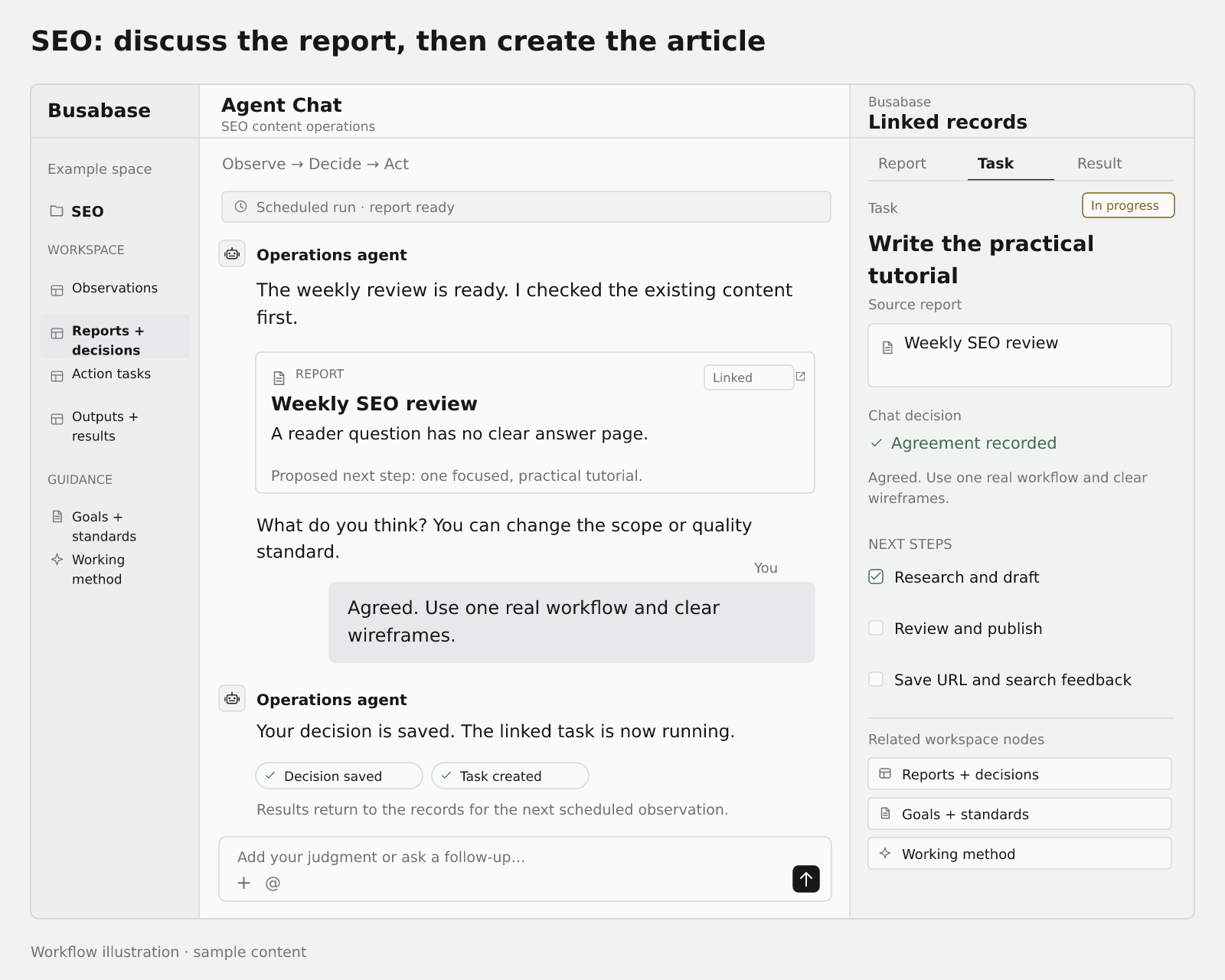
Observe. The scheduled agent reads Search Console queries and page performance, relevant site traffic, content requests, existing coverage, and previous outputs. It checks whether a reader question needs a new answer or an existing-page update. Keep source dates and use comparable windows.
Decide. The report explains the opportunity, evidence, existing pages checked, proposed angle, and priority. In chat, you might say: “Agreed. Show one real workflow, use wireframes, and make the steps reproducible.” The agent saves that direction against the report and turns it into a writing brief. A request to revise or wait stays visible too.
Act. The execution agent creates or reuses the content task, researches and writes the CMS article, and follows the agreed review and publication process. It records the actual URL and publication state. A later cycle checks whether the page is accessible and what mature search observations can support. Delivery and later effect remain distinct.
Build this workspace in Busabase
Use an SEO Operations Folder with these nodes. Names and fields are starter suggestions, not a required built-in template.
| Node | Name | Suggested fields or content, and purpose |
|---|---|---|
| Base | Search observations | Period, query, page URL, impressions, clicks, data-through date, source. Holds the evidence behind content choices. |
| Base | Weekly reports and decisions | Period, Markdown report, related observations, human direction, decision status, conversation reference. Connects the report to what was agreed in chat. |
| Base | Content tasks | Source report, reader problem, brief, status, acceptance criteria, output URL. Tracks actual delivery. |
| Base | CMS posts | Title, locale, body, cover, publication state, canonical URL. Use your existing CMS Base or store its record link or URL instead of making a duplicate. |
| Doc | Goals and editorial standards | Target readers, useful questions, topic boundaries, examples, and quality criteria. Holds the human editorial direction. |
| Skill | SEO content procedure | How to read evidence, report, capture chat decisions, create tasks, write, and record results. |
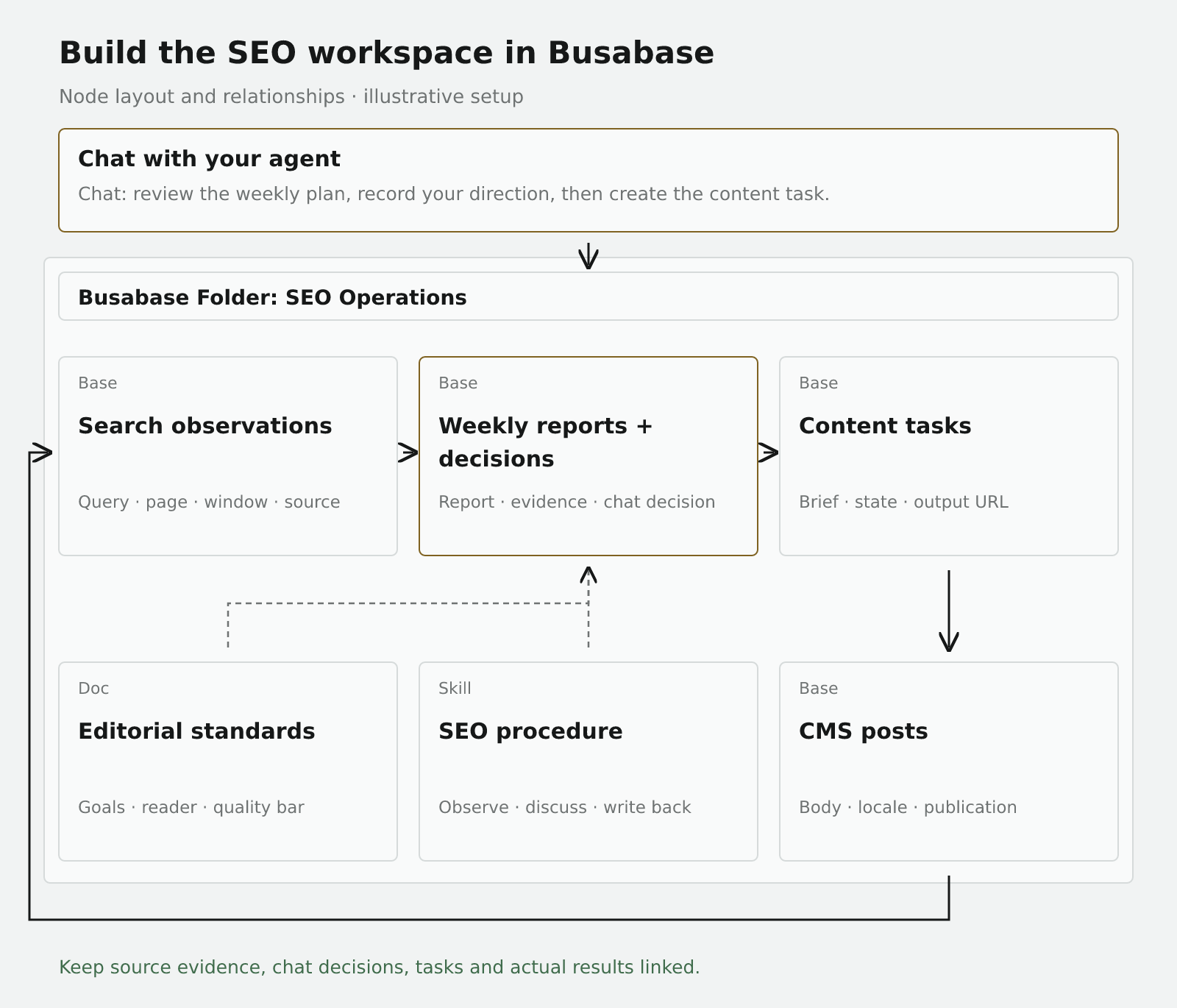
Connect the records: reports relate to observations; tasks relate to their source report; tasks link to the CMS record or published URL. Later observations use that page and a dated window to connect performance back to the work. Reuse tasks by a stable topic key instead of recreating the same assignment every week.
Your chat instruction can be: “Prepare the weekly report from these observations and previous tasks. Bring me the proposed content plan here. Record my changes and the agreed brief, then execute within the authorized publication workflow and save the output.”
Example 2: handle replies to marketing and support emails
A reply can express interest, ask a question, report a defect, request no further marketing, or simply be an automatic out-of-office response. Those inputs need different next steps. This is a workflow design example, not a claim about a particular customer deployment.
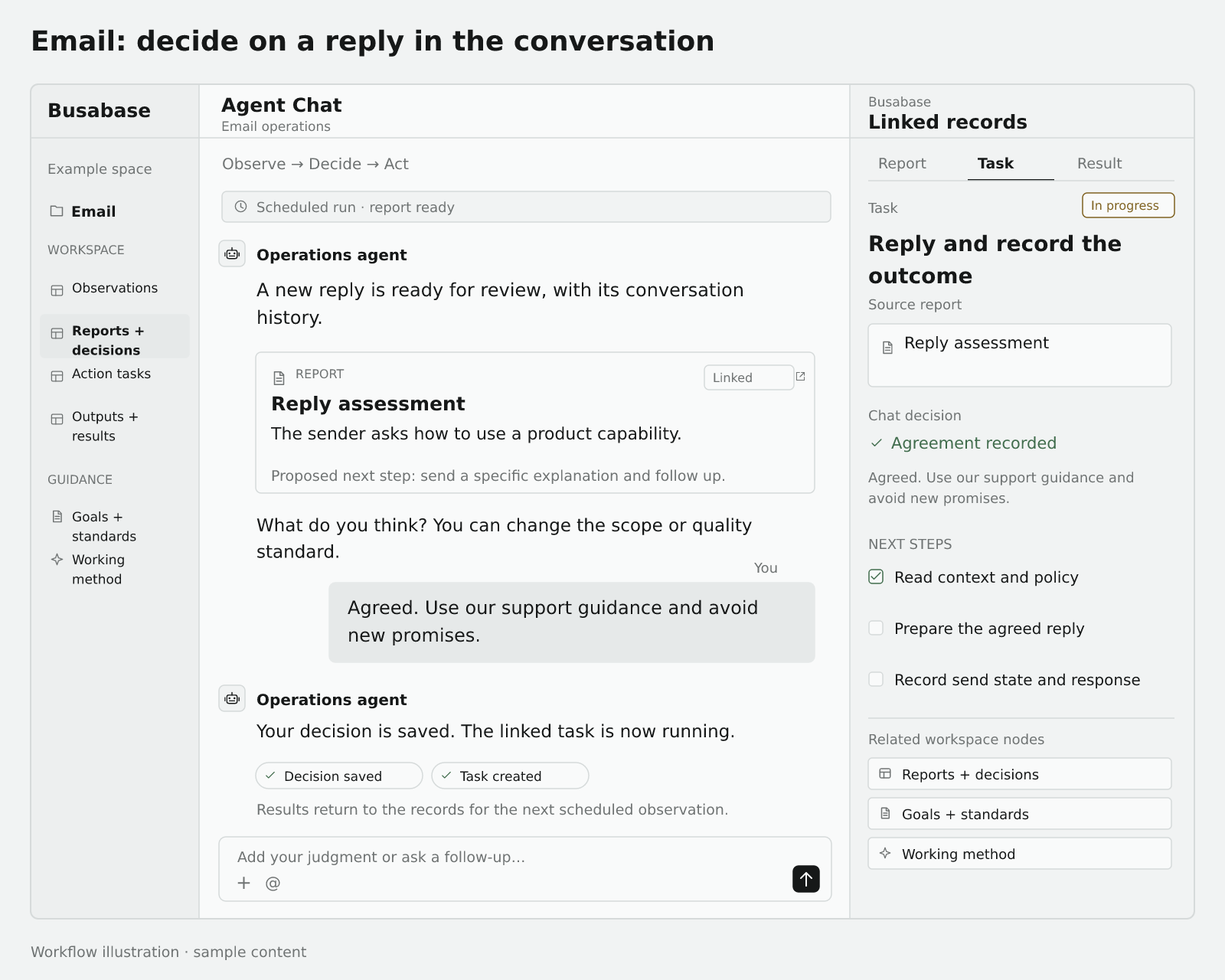
Observe. Your connected mailbox or email platform writes new messages with their message ID, thread ID, contact, campaign reference, timestamp, direction, and original content. The agent reads the conversation, earlier actions, and current subscription state, distinguishing human replies, automatic replies, and delivery failures.
Decide. AI summarizes the intent and evidence and proposes a response. In chat, you can set the tone, clarify what may be promised, approve the next step, or hand the case to someone else.
- Marketing replies: a request about a feature can become a relevant explanation or follow-up task. An explicit request to stop marketing should update the actual sending platform's contact or suppression state, along with the workspace record.
- Support replies: an operational question can become an answer task; a reported defect can link to a bug task. Ask for missing facts when needed and route unresolved service commitments to the responsible person.
Act. The agent prepares and sends within the established authorization, or creates a follow-up or handoff. Save the actual send status, outgoing message ID, response, and contact changes. The next reply continues the same thread. Deduplicate by source message ID and check actual send state before retrying so a repeated event does not produce a second answer.
Build this workspace in Busabase
Create an Email Operations Folder:
| Node | Name | Suggested fields or content, and purpose |
|---|---|---|
| Base | Messages | Message ID, thread ID, direction, related contact, timestamp, original body, campaign, handling state. Preserves the conversation and source evidence. |
| Base | Contacts and subscriptions | Contact, address, customer stage, marketing-contact state, last contact. Keeps follow-ups aligned with the current customer state. |
| Base | Reply assessments and decisions | Source message, contact, intent, evidence, proposed response, human direction, decision, chat reference. Makes the proposed handling and agreement traceable. |
| Base | Reply and follow-up tasks | Source decision, thread, owner, action, draft, state, outgoing message ID, actual result. Carries replies, follow-ups, and handoffs into execution. |
| Doc | Reply guidance and service policy | Product facts, service boundaries, tone examples, and handoff rules. Supplies an answer's factual basis. |
| Skill | Email handling procedure | How to read threads, classify, report, capture decisions, send within scope, update subscription state, deduplicate, and write back. |
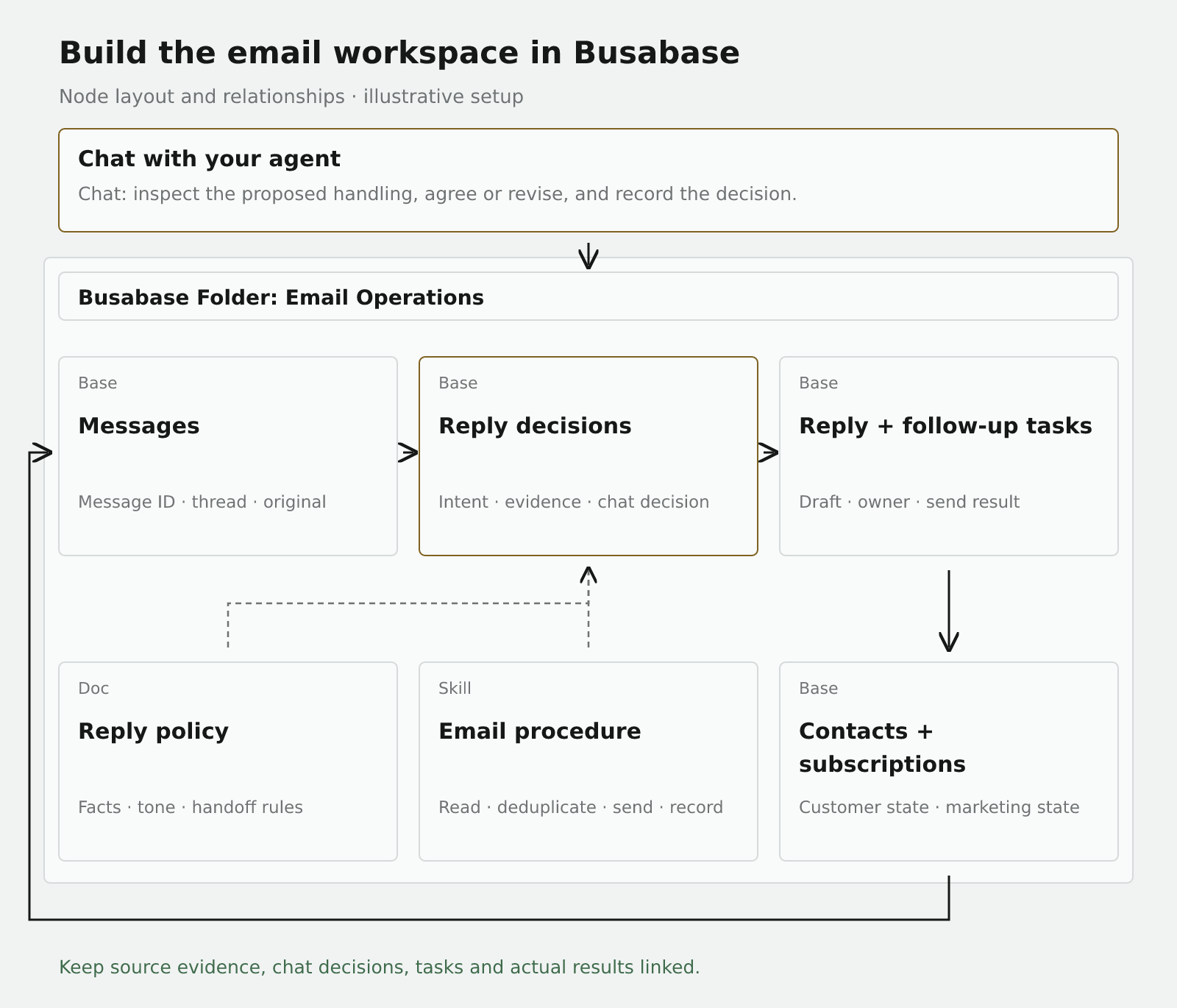
Connect the records: each message relates to a contact; each assessment relates to the original message and contact; a task relates to the assessment and thread. Outgoing replies return to Messages. Subscription changes update both the contact record and the sending platform. From a proposal in chat, a person can follow the source message and the task's actual result.
The scheduled report can also summarize recurring questions, promising replies, and gaps in reply guidance. That turns the handling of one conversation into useful direction for the next batch.
Example 3: turn GA4 and Clarity observations into fixes and releases
Product operations can carry the same loop into code changes. Google Analytics 4's funnel exploration helps locate incomplete steps in a user journey. Microsoft Clarity's behavioral metrics provide clues such as rage clicks, dead clicks, and related errors.
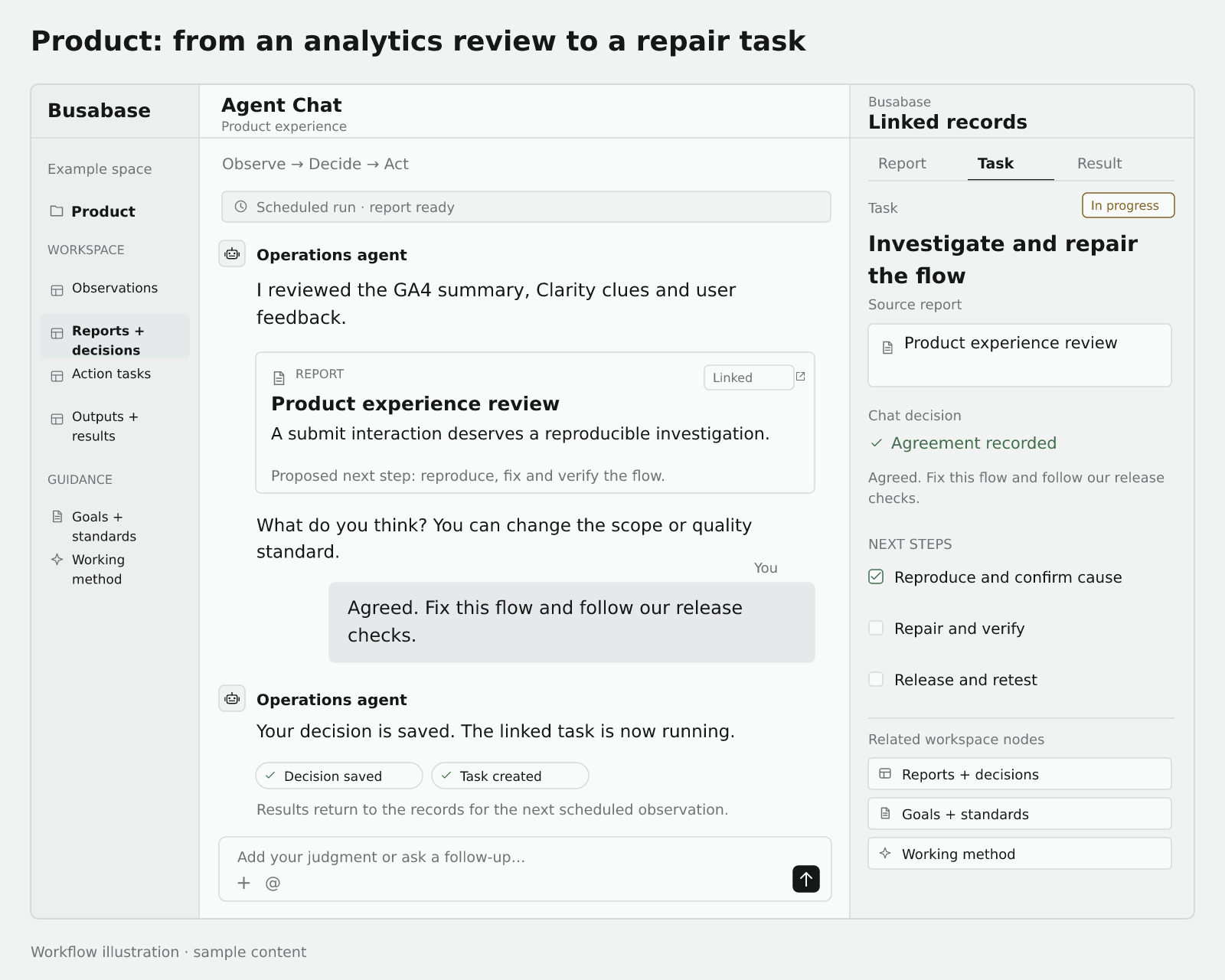
Observe. Write GA4 event and funnel summaries, behavior evidence gathered from available Clarity heatmaps or recordings, and user complaints into the observation table. Preserve evidence URLs and collection windows. Ingest only what the configured APIs, exports, or tools make available; do not assume the two platforms identify the same users or sessions.
For example, a key flow loses more users on a particular browser while behavior evidence shows repeated clicks on its submit control. That supports investigation. The cause still needs reproduction.
Decide. AI reports the anomaly, impact, evidence, possible explanations, and recommended work. In chat, the owner sets priority and the expected experience: “Reproduce this environment, confirm the cause, fix the control's response, and verify the original flow.” The decision becomes a task with a testable acceptance condition.
Act. A coding agent reads the task and evidence, reproduces the issue, finds the cause, changes the code, performs focused verification, and follows the established release process. Write back the change link, verification result, deployed version, and production retest. Work already authorized for repair and release can continue through those steps; other decisions follow the team's rules.
After deployment, test the original interaction and check that event collection is still correct. Later, compare suitable windows of funnel behavior, related friction, and user feedback. A merged change, a deployed release, and an improved user outcome each need their own evidence.
Build this workspace in Busabase
Create a Product Experience Folder:
| Node | Name | Suggested fields or content, and purpose |
|---|---|---|
| Base | Behavior observations | Source, period, event or funnel step, page, device/browser, anomaly, evidence URL. Collects facts to explain. |
| Base | Experience reports and decisions | Period or incident, related observations, AI assessment, impact, human direction, priority, action guidance, chat reference. Captures what to investigate and why. |
| Base | Issues and repair tasks | Source report, reproduction steps, expected and actual behavior, owner, state, acceptance criteria, code-change link. Drives the repair. |
| Base | Releases and retests | Related task, deployed version, release time, production retest, later observation window, outcome judgment. Separates delivery, deployment, and improvement. |
| Doc | Product goals and acceptance standards | Key journeys, intended experience, test requirements, and release standards. Preserves human quality judgment. |
| Skill | Product improvement procedure | How to collect evidence, report, record chat decisions, hand work to a coding agent, reproduce, verify, release, and save results. |
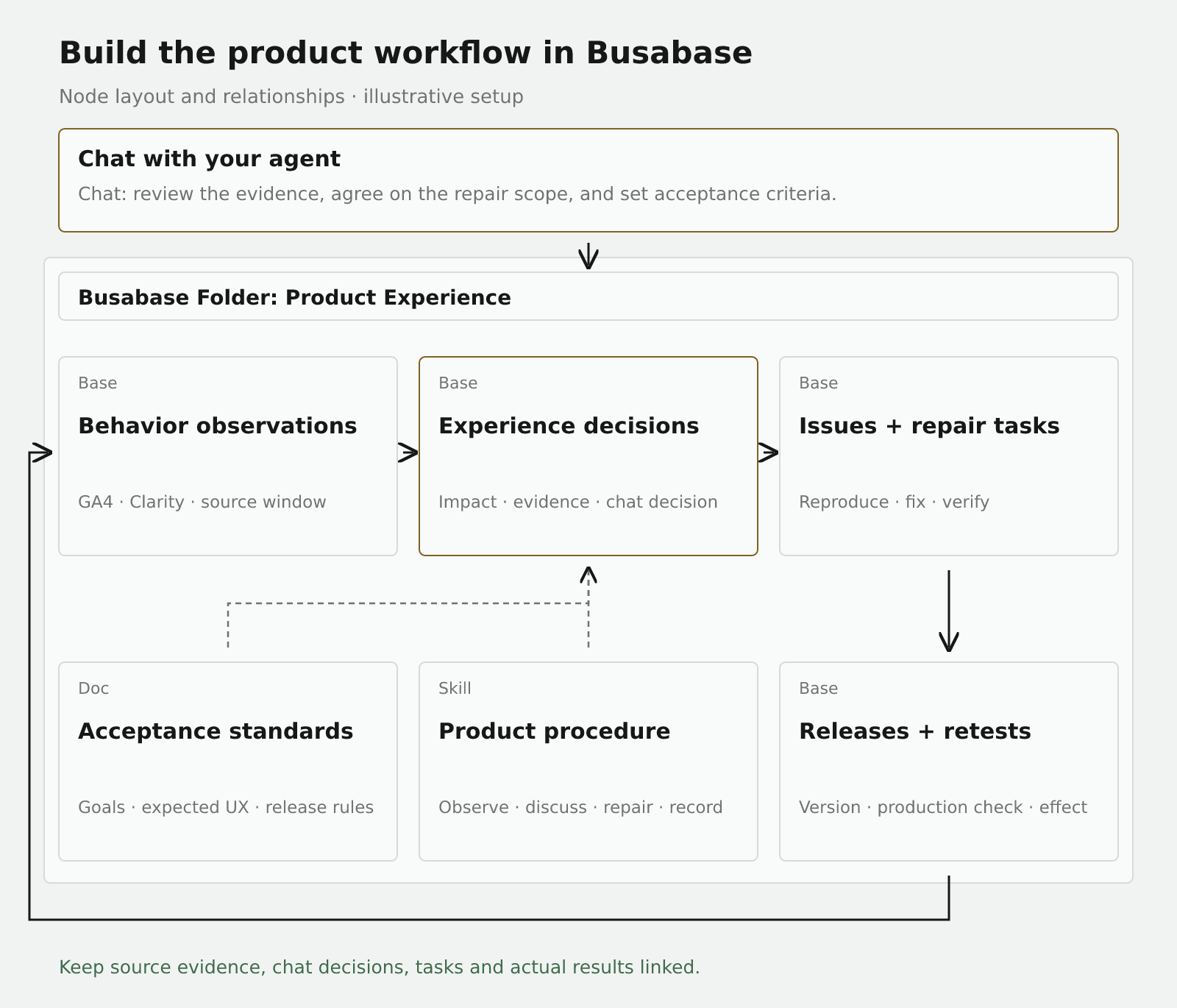
Connect the records: reports relate to observations; repair tasks relate to their source report; releases and retests relate to the task and version. Later observations carry the relevant release and time window. The next cycle can then distinguish unfinished work, an unverified deployment, and evidence of a resolved problem.
Start with one Folder and one real cycle
Follow Get Started with Agents to connect the agent you use. Choose a scenario, prepare its Folder and nodes, and reuse existing resources where appropriate.
Run once manually: capture an observation, create a report or assessment, discuss it in chat, save the decision, and follow one task through to an actual result. Check that evidence, direction, task, and output remain linked. Then configure a schedule or incoming-data trigger in your agent platform or automation runner.
A workspace Skill can start with this instruction. Agent Playbooks explains how connected agents discover saved procedures and prompts.
OBSERVE
Read current data, requests, user feedback, and previous action results.
Check sources, dates, measurement definitions, and duplicate records.
Read the goals, policy or quality standards, and saved human corrections.

DECIDE
Write an evidence-linked report with interpretation, uncertainties,
and recommended next steps. Bring the proposal to our chat.
Record my agreement, changes, rejection, or request for more evidence
against the specific proposal, then save the resulting action guidance.

ACT
Create or reuse the task with a deliverable, owner, and acceptance criteria.
Use the connected tools within the agreed scope. Record the actual output,
execution state, verification or reply, and any unresolved work.

At the next observation, read these results and human direction before
proposing another action.
The essential test is whether the next run can explain how the previous result and your judgment changed its current recommendation. If evidence is not ready, record what it still needs.
Busabase Change Requests preserve the message, diff, and history of writes; permissions determine whether they merge immediately or await review. The shared workspace keeps observations and human judgment durable while agents and connected tools carry out the work.
Start with one goal, one Folder, and one delivered task in Busabase. AI helps you understand what happened, you decide what matters and what good looks like, and the agent turns that direction into work. Its results start the next cycle.