AI OPERATIONS
Run AI operations from the work, not scattered chats
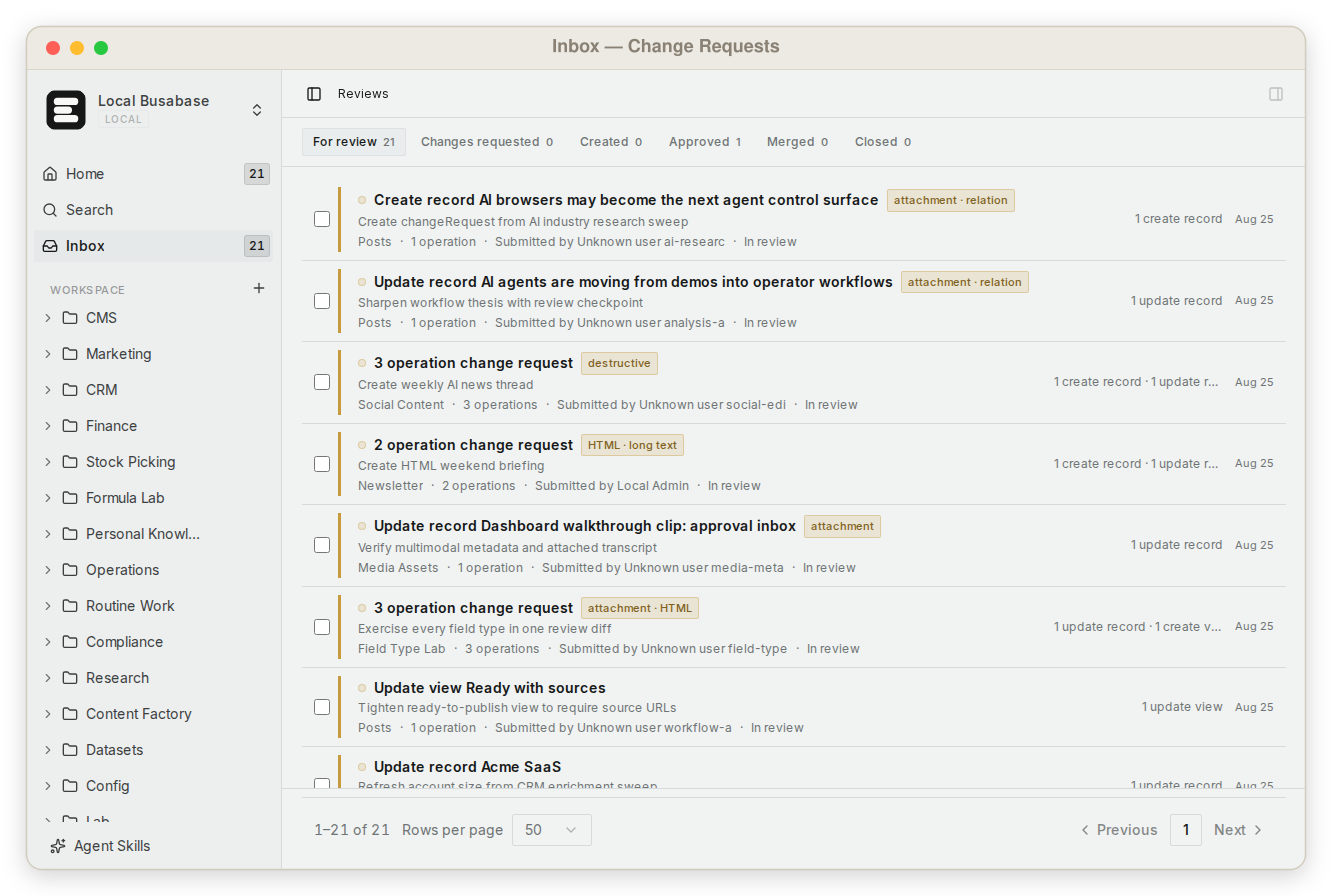
Busabase gives AI Operations teams one shared workspace for agent proposals, human decisions, canonical records, reusable skills, and live operating views. See what is waiting, who owns the decision, and which result downstream work may trust.
The operating gap
More agents create more invisible queues unless the work shares one state
AI Operations breaks when each agent keeps its own chat history, draft folder, and definition of done. Teams cannot see what is blocked, what was accepted, or which result another agent is allowed to reuse.
Visibility
One queue for consequential proposals
Review work by status and impact instead of monitoring every agent conversation.
Ownership
A person owns the decision
Attach responsibility to the record and acceptance point, not to whoever last opened the chat.
Continuity
Approved state survives the session
Canonical records, Docs, files, Skills, and AirApps remain available to the next agent and teammate.
Recovery
Rejected work stays explainable
Diffs, comments, versions, and provenance show why a proposal changed or never became truth.
AI operations loop
Operate agents through shared work, not a fleet dashboard alone
Busabase is not an agent runtime or headcount registry. It is the operating layer where outputs become visible work and accepted state.
Give a compatible agent scoped access through a Skill, MCP, or OpenAPI.
The agent submits structured changes, files, or app updates with a specific message.
AI Operations sees pending work, ownership, and the next human decision in one Inbox.
A reviewer inspects the real result and evidence before it becomes canonical.
People, agents, APIs, automations, and AirApps read the same accepted state.
Operating contract
Every consequential agent result carries enough context to act on
The useful unit is not an agent run. It is a reviewable result with state, responsibility, evidence, and a clear downstream effect.
| Operational signal | Accountable owner | What the team gains |
|---|---|---|
| Pending proposal | Workflow owner | A visible decision queue instead of a hidden draft |
| Field or file diff | Reviewer | The exact proposed change, not a summary |
| Source and evidence | Domain owner | A basis for accepting or rejecting the result |
| Merged record and history | Workspace team | Durable state the next workflow can reuse |
Durable operations
The accepted result remains visible after the agent stops
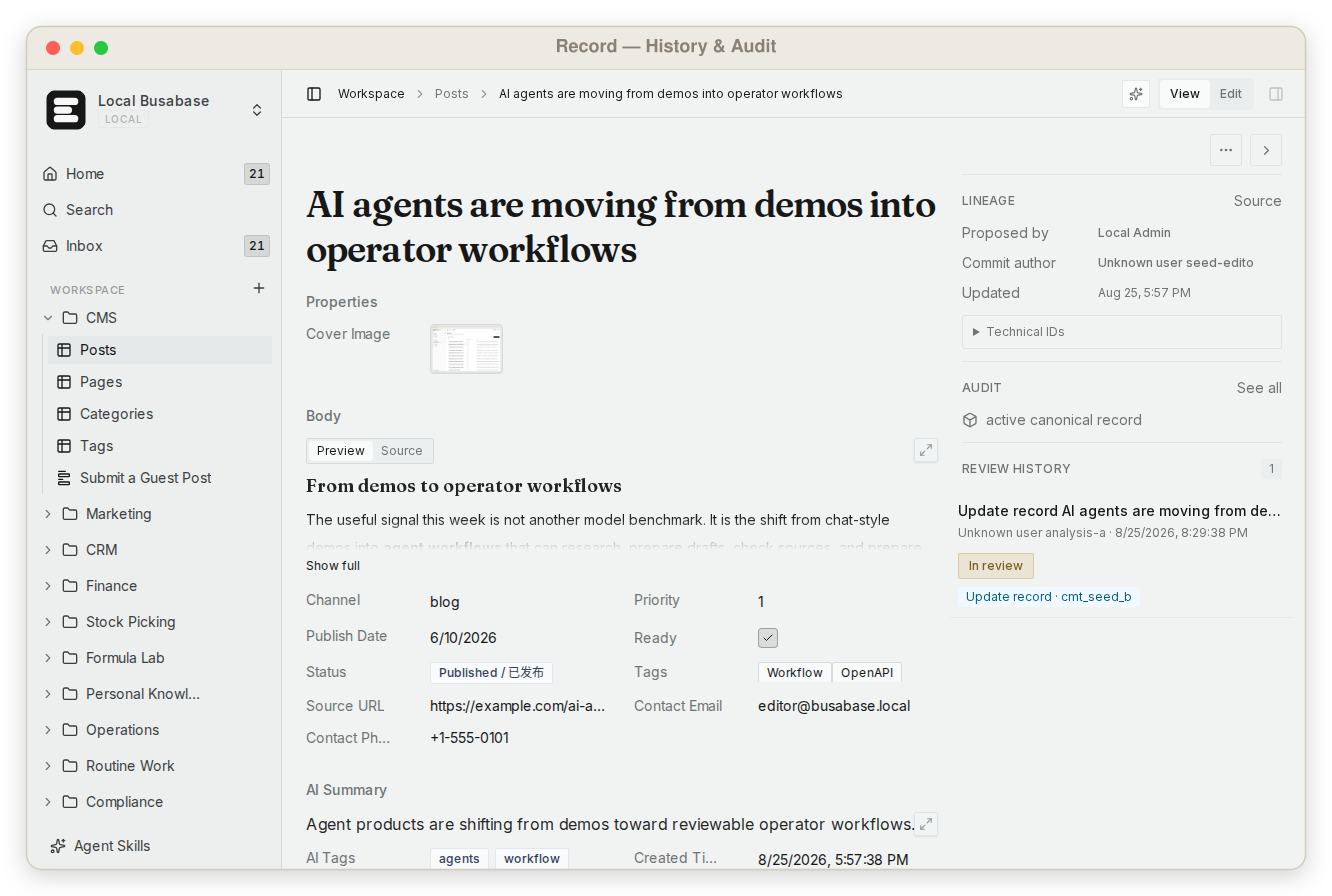
Record detail keeps the current value beside its lineage and review history. That lets operators investigate a decision, recover context, and improve prompts or Skills without rebuilding the story from logs.
Best fit
Shared agent work with consequential state
- Several agents or automations create work for the same team
- People need one place to triage and accept important changes
- Accepted outputs must survive across sessions and tools
- The team needs visible provenance and recovery
Product boundary
Not a runtime or telemetry platform
- Use an agent platform to schedule and host long-running agent processes
- Use observability infrastructure for high-volume traces and metrics
- Use a transactional database for synchronous application writes
- Use an agent registry when the primary job is inventory, spend, and model governance
AI Operations questions
Does Busabase run or schedule agents?
No. Agents run where you choose. Busabase holds the shared work, review boundary, accepted state, and reusable operating artifacts around those agents.
Does every agent action need approval?
No. Review the writes that create business facts or downstream consequences. Scratch work, retrieval caches, and low-risk operations can remain lightweight.
Can several agents use one workspace?
Yes. Compatible agents can read the same approved records, Docs, files, and Skills while their material writes remain attributable proposals.
How does an operator recover from a bad proposal?
Reject it or request changes before merge. The proposal and its history remain visible, so the team can improve the workflow without corrupting canonical data.
One workspace, many agents
Give AI Operations a visible place to decide what becomes trusted
Connect one agent, route one consequential result through review, and let the next workflow reuse the accepted state.