Budget Desk Template: Check Open Commitments and Stale Forecasts Before Budget Decisions
Keep closed-month spend, uninvoiced POs, and forecast refresh dates separate so hidden overruns show up early.
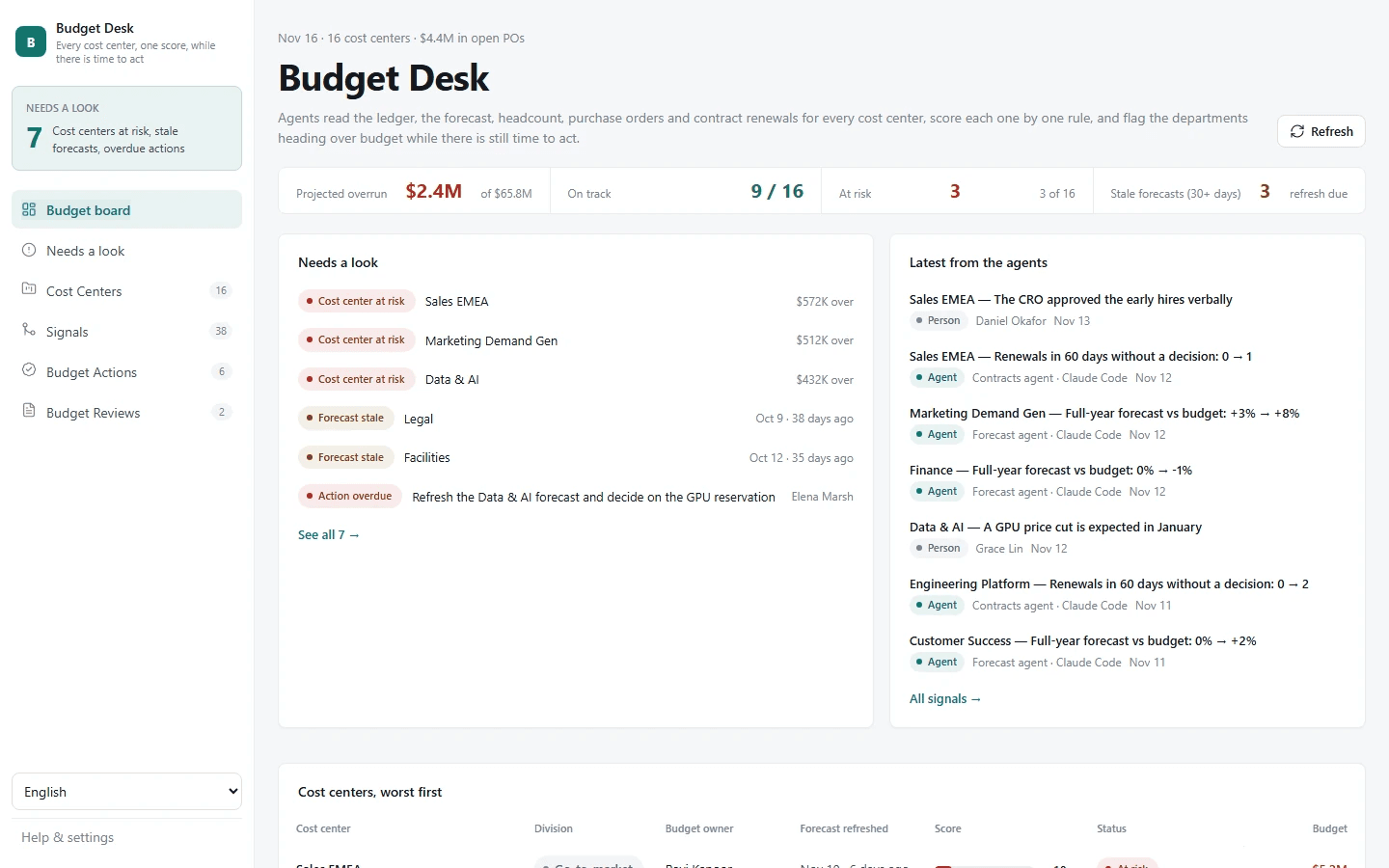
A department budget often looks healthy right up until the moment a finance partner runs out of room to act. Closed-month actuals still sit below the year-to-date plan, yet the team has already issued purchase orders that have not been invoiced, or the full-year forecast has not been updated since the start of the quarter.
When those numbers blur together, routine budget reviews miss two traps: counting uninvoiced commitments twice, or mistaking a stale estimate for a clean bill of health.
The Budget Desk template structures cost-center tracking around four shared tables and a single scoring rule so finance partners and budget owners see what is already spent, what is already committed, and which numbers can no longer be trusted.
Keep closed actuals, open commitments, and full-year forecasts separate
Every budget decision relies on four distinct figures that answer different questions:
- Year-to-date budget and actuals: Money planned and spent from the start of the fiscal year through the last closed month in the general ledger.
- Open commitments: Approved purchase orders that have not yet been invoiced.
- Full-year forecast: Actual spend to date, plus open commitments, plus the expected run rate for the remaining months.
- Annual budget: The approved full-year ceiling owned by leadership and finance after authorized transfers.
Because the full-year forecast already incorporates open commitments, finance teams must never add open purchase orders on top of the forecast. Adding them again double-counts the same planned spend and exaggerates the projected overrun.
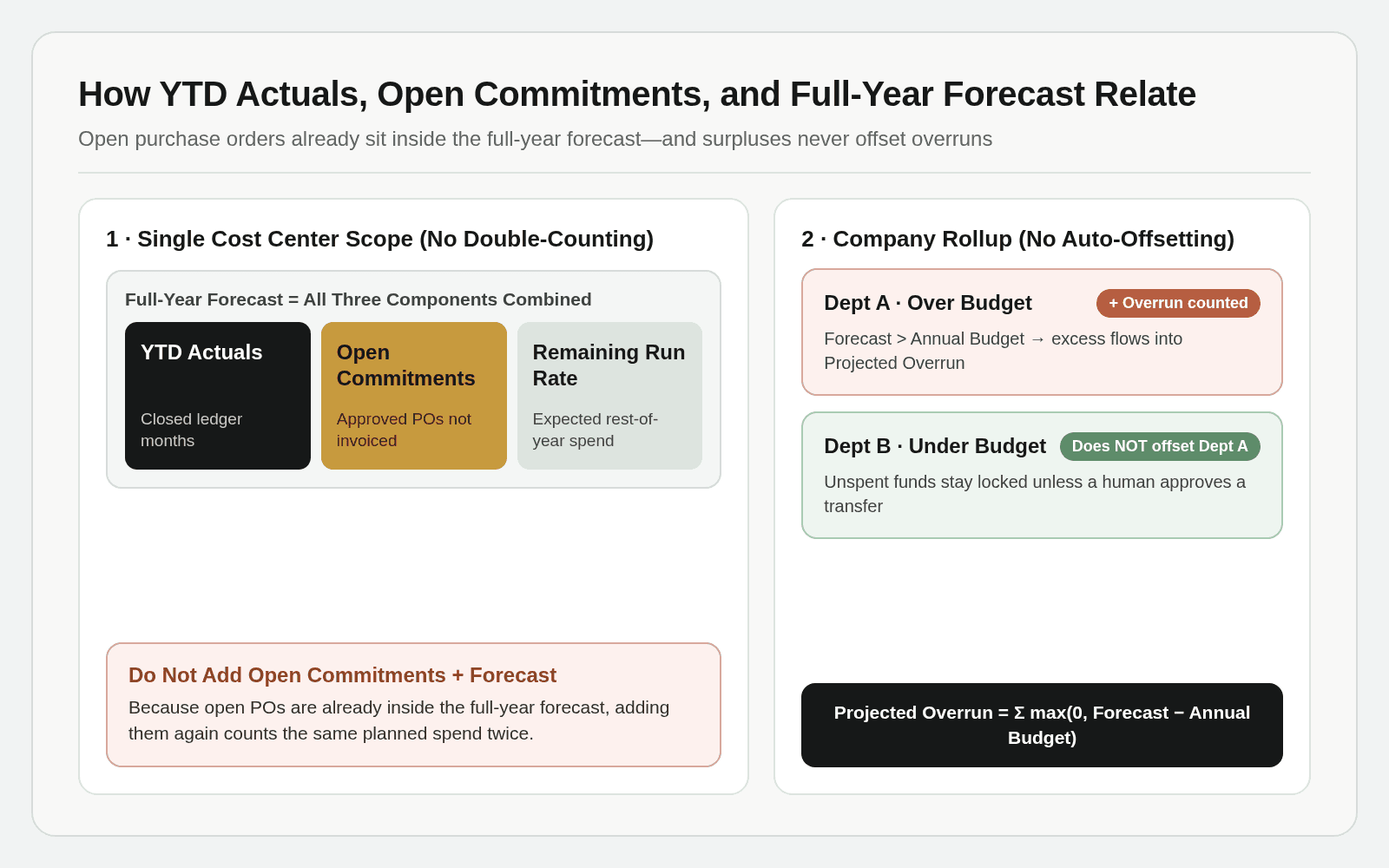
Just as important, a surplus in one cost center does not automatically rescue another. Budget Desk calculates projected overrun by summing only the departments whose forecast exceeds their annual budget. Unspent funds elsewhere stay locked until a person explicitly approves a budget transfer.
Four shared tables with strict source ownership
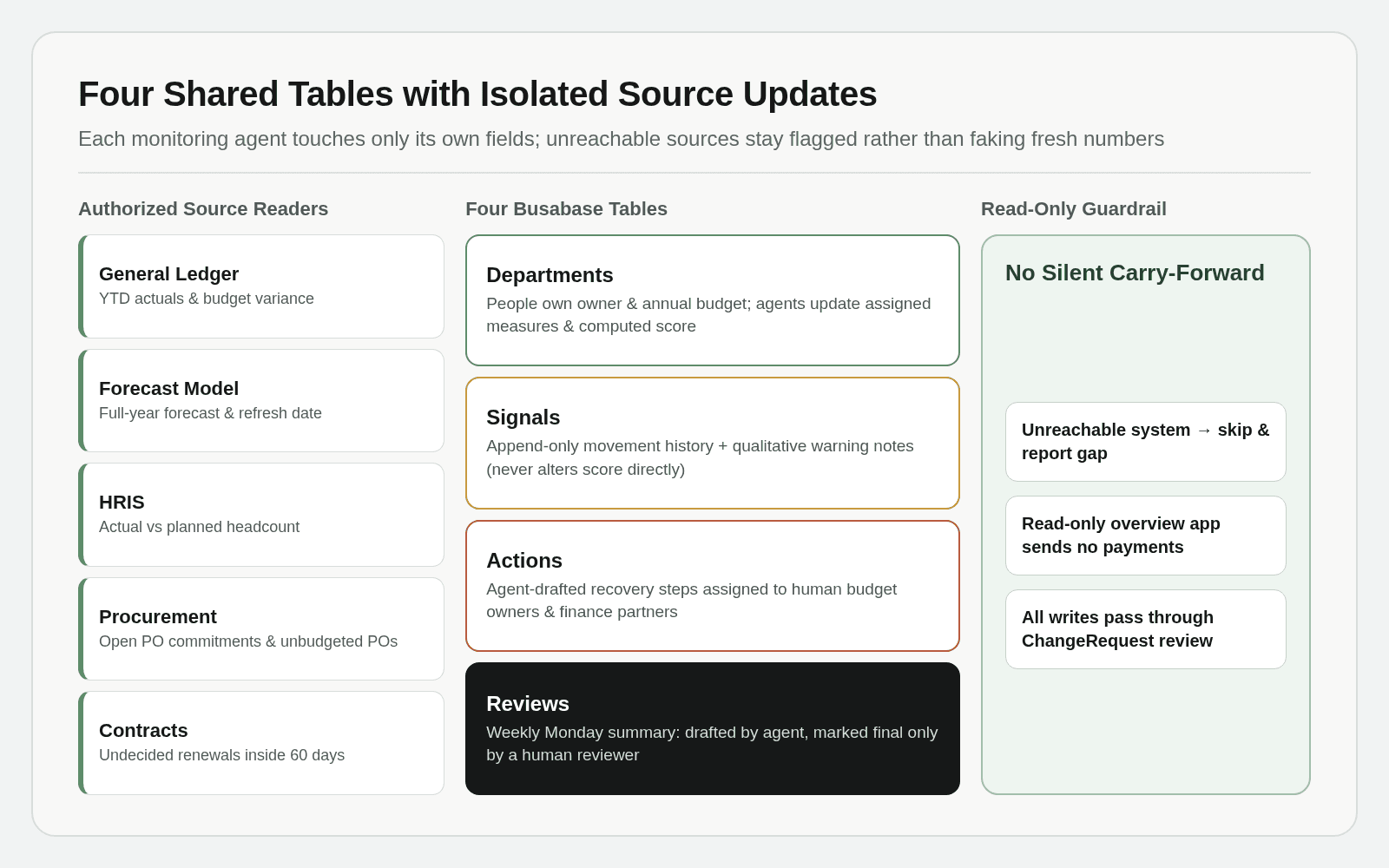
Budget Desk installs four connected tables and a read-only overview app in your workspace:
| Table | What each row represents | Who updates it |
|---|---|---|
| Departments | One cost center's budget, actuals, forecast, commitments, five measures, and score | People own the name, division, budget owner, finance partner, and annual budget; specialized agents update only their assigned source fields |
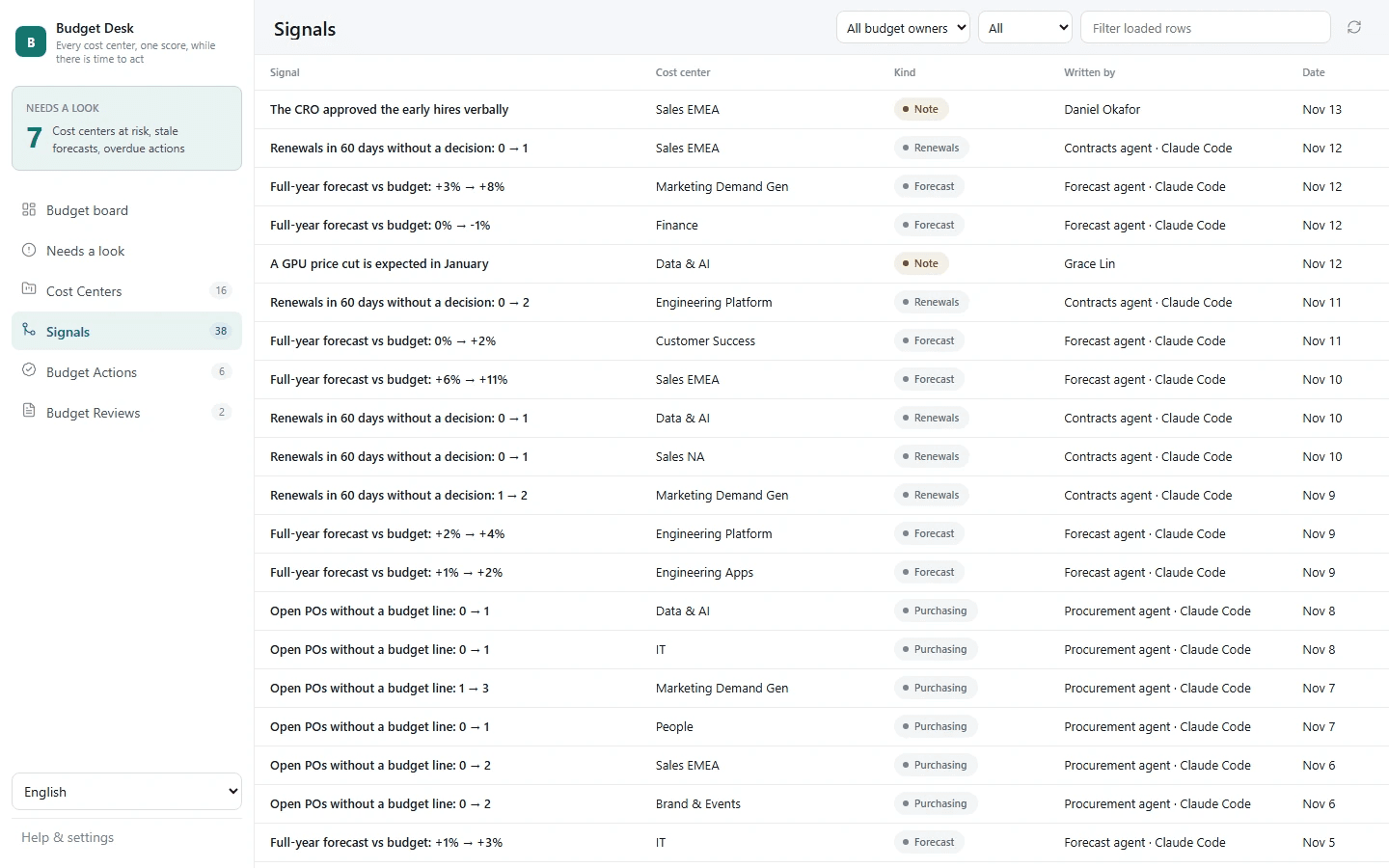
| Signals | One change in a cost center's measure or a qualitative note with supporting evidence | Each source-reading agent or a team member appends new rows without overwriting history |
| Actions | A concrete recovery plan with an owner and due date when a budget drifts off track | An agent proposes the action; a budget owner or finance partner owns execution |
| Reviews | The weekly Monday budget summary across all cost centers | An agent drafts the review from current records; a person marks it final |
Each monitoring agent reads only its own upstream system—general ledger, forecast model, HRIS, procurement, or contract register—and writes only the fields tied to that source. If an upstream system is unreachable, the agent skips that cost center and reports the gap rather than carrying an old reading forward as if it were fresh.
Qualitative notes—such as a verbal approval or an upcoming vendor price change—live in Signals as well. A note never alters the numeric score directly, yet it often surfaces risks before an invoice or purchase order hits the ledger.
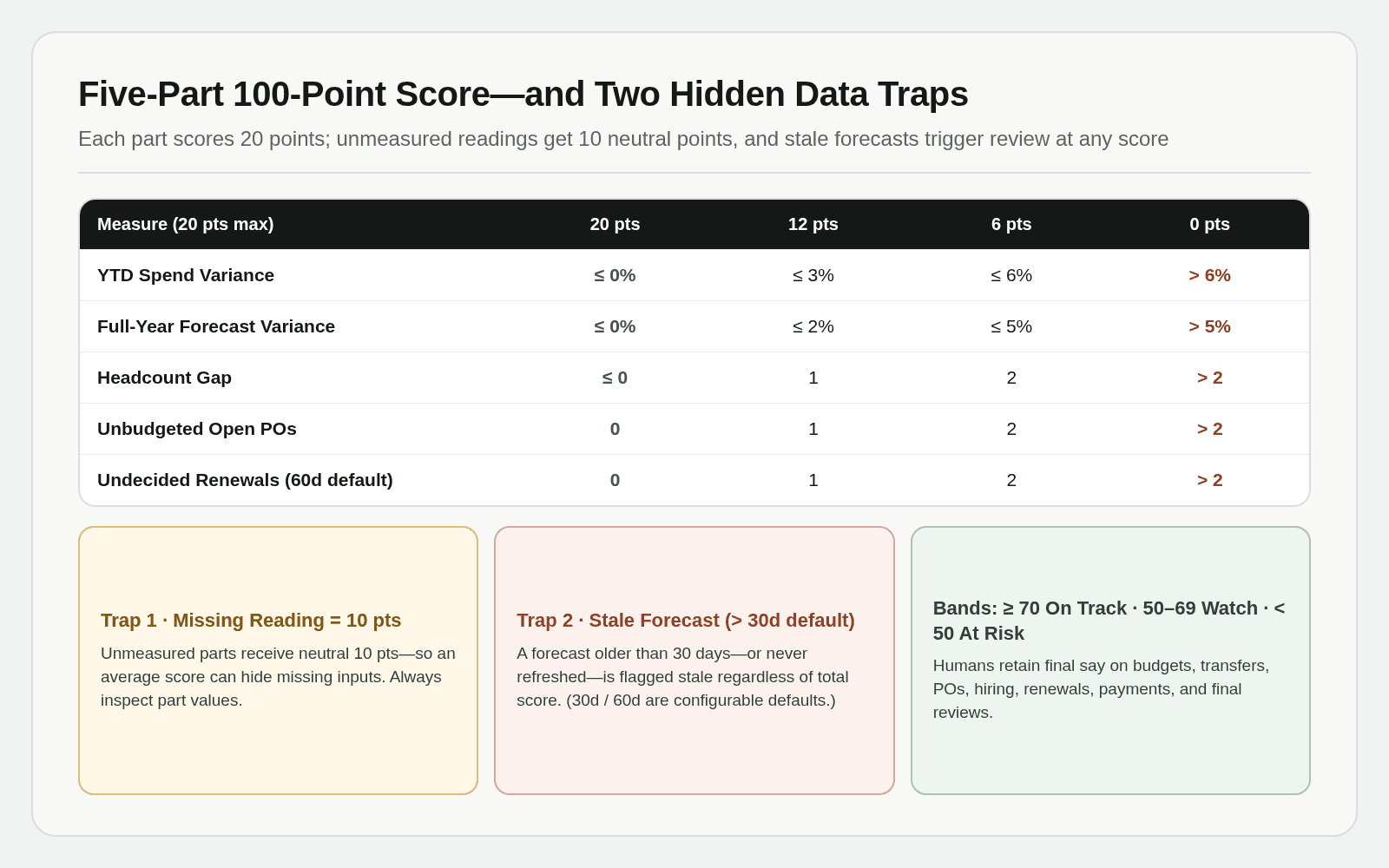
Why a passing score can still hide stale or missing data
Every cost center is scored on a 0–100 scale across five equally weighted parts of 20 points each:
- Year-to-date spend variance:
≤ 0%scores 20;≤ 3%scores 12;≤ 6%scores 6; above6%scores 0. - Full-year forecast variance:
≤ 0%scores 20;≤ 2%scores 12;≤ 5%scores 6; above5%scores 0. - Headcount gap against plan:
≤ 0heads over plan scores 20;1scores 12;2scores 6; more than2scores 0. - Unbudgeted open purchase orders:
0scores 20;1scores 12;2scores 6; more than2scores 0. - Undecided contract renewals: Contracts renewing within the next 60 days without a renew, cut, or cancel decision—
0scores 20;1scores 12;2scores 6; more than2scores 0.
Totals of 70 or above map to On Track, 50–69 map to Watch, and below 50 map to At Risk.
Two rules prevent false confidence. First, any unmeasured input scores 10 points—neutral rather than healthy. A cost center missing several readings can still sit in the Watch band, so reviewers always trace the total score back to each underlying part. Second, any forecast not refreshed within the last 30 days (or never refreshed) is flagged as stale regardless of its score. Both the 30-day forecast window and the 60-day renewal window are template defaults that teams can tune to their own close and procurement cycles.
Separate AI proposals from human financial authority
Budget Desk enforces a clear boundary between calculation and spending authority. The workspace app itself is read-only: it neither pulls live data automatically from your ERP, HRIS, or procurement tools nor sends payments or approvals outside Busabase. Connected agents read only the sources you explicitly authorize and submit proposed updates through ChangeRequests.
That means:
- What agents do: Append evidence-backed signals, recompute the five-part score, draft corrective actions, and prepare Monday's draft review.
- What people decide: Set or transfer annual budgets, approve or cancel purchase orders, authorize hiring, decide contract renewals, release payments, and mark weekly reviews final.
If a department shows unbudgeted purchase orders, pending renewals, and an outdated forecast at the same time, treat them as separate workstreams—route unbudgeted POs to procurement review, assign renewal owners before notice deadlines close, and demand a forecast refresh before freezing spend.
Related workflows in Busabase
- Reconcile closed transactions and mismatched payments with Busa Audit.
- Catch advance notice windows before contracts auto-renew with Busa CLM.
- Review and revise agent proposals without losing audit context in the ChangeRequest revision loop.
- Start from the Budget Desk template page to sign in and install it into your target workspace.