Busa Support Template: What the Reply Gate Checks—and What Humans Must Verify Before Sending
See what the four deterministic checks actually block, why FIX warnings still need judgment, and how approval stays separate from channel delivery.
A support ticket comes in, an agent drafts a detailed reply with a knowledge-base citation attached, and someone clicks approve—yet a customer still receives an outdated policy or never gets a response at all.
Those breakdowns happen when teams assume a "grounded" label verifies factual accuracy, or treat clicking Approve inside a review queue as the same event as a message landing in a customer's inbox.
The Busa Support template puts every incoming ticket through a structured approval queue and a four-part reply-quality gate, while keeping real external delivery behind separately configured channel connectors.
Six linked tables—and why verdicts are computed live
Busa Support organizes your support desk across six Busabase tables resolved by workspace resource stamp:
- Accounts: Channel metadata and connectors (email, WhatsApp, web chat, contact form, WeChat). Accounts store only the names of environment variables holding credentials—never passwords, QR payloads, or raw tokens.
- Tickets: The central approval queue combining customer details, proposed action, the editable reply draft, cited KB IDs, SLA targets, optional CSAT ratings, human verdicts, and execution markers.
- Messages: Full conversation messages linked to each ticket.
- Knowledge Base: Official help articles and canned macros the agent cites.
- Sync Log: Append-only history of collection runs per account.
- Settings: Workspace configuration for SLA targets, risk guardrails, and reply style.
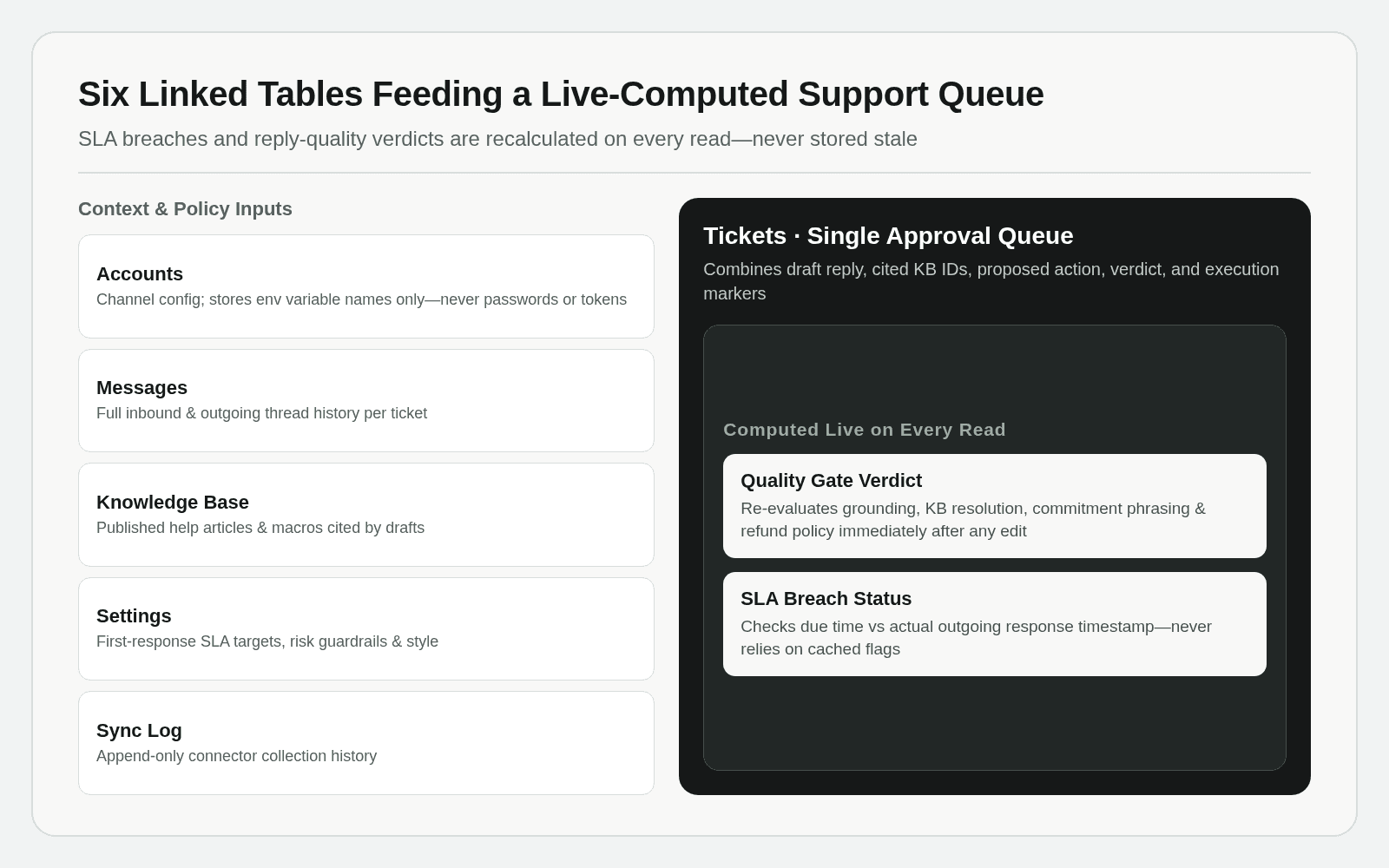
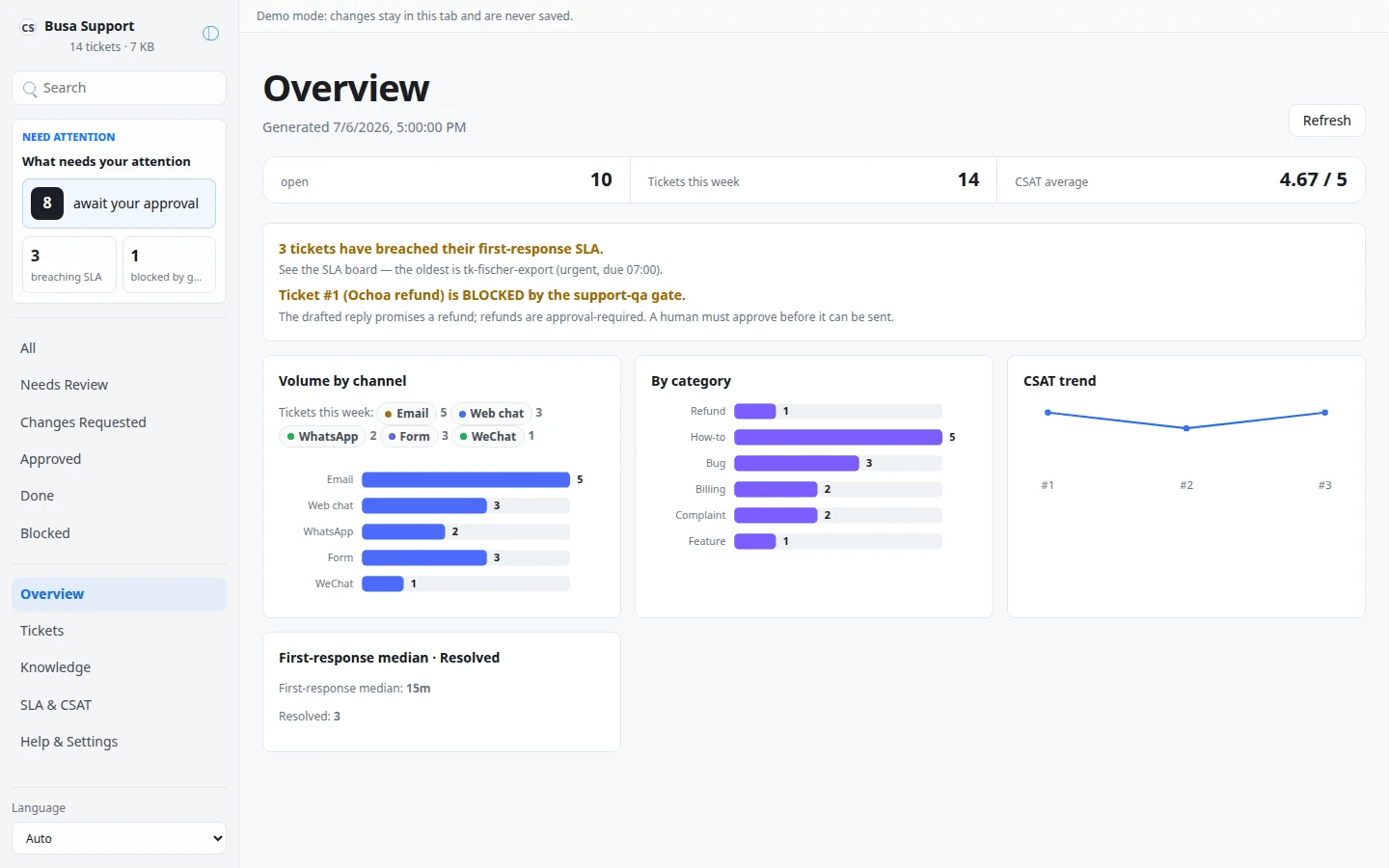
Crucially, both SLA breach status and the reply-quality verdict are recalculated live every time the desk loads tickets, messages, and knowledge-base records—never stored statically in the database. When a reviewer edits a draft reply, the gate updates immediately so an old passing verdict never masks a newly introduced policy issue.
What the four automated checks catch—and what they miss
Every drafted reply is evaluated by four deterministic rules before a ticket leaves the review queue:
- Grounding check: Any substantive reply of 40 characters or more must cite at least one valid article ID from the Knowledge Base. Short acknowledgements under 40 characters are exempt. Boundary: This confirms a real article ID is attached; it does not read the paragraph to verify whether the reply contradicts the article.
- Reference resolution check: Every cited reference must match an existing article in the Knowledge Base. A dangling or typoed ID triggers a FIX warning, not a hard block.
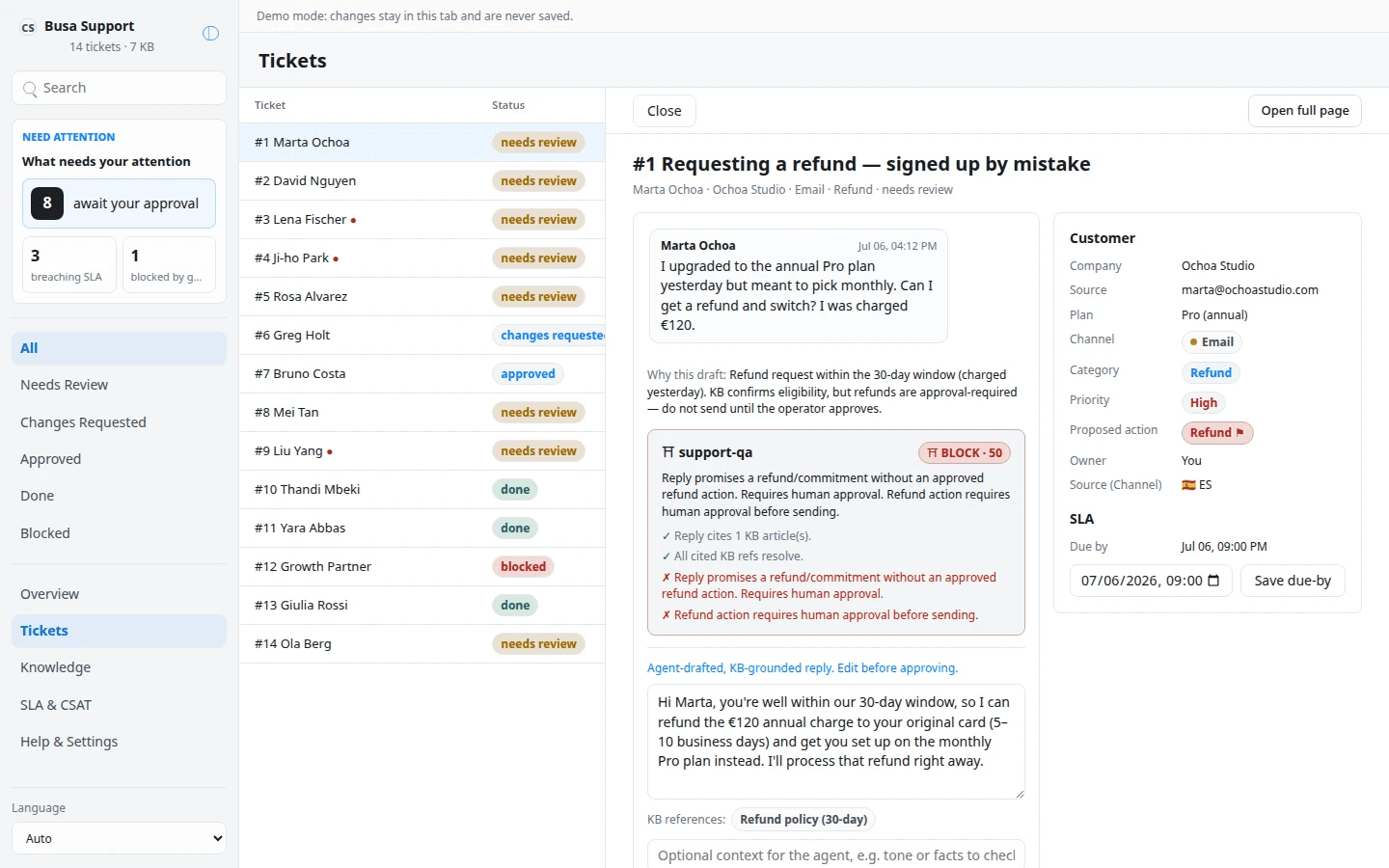
- Unapproved commitment check: An English keyword filter scans the reply for refund, reimbursement, compensation, guarantee, free-month, discount-code, or credit promises. Unless commitment guarding is turned off in risk settings—or the ticket is an approved refund action—matching text triggers a hard BLOCK. Boundary: Because this relies on English phrasing rules, non-English promises or subtle paraphrased commitments are not caught automatically.
- Refund policy check: A ticket proposing a refund action stays at BLOCK until a human marks the ticket approved (or risk settings explicitly disable refund approval within an auto-refund cap).
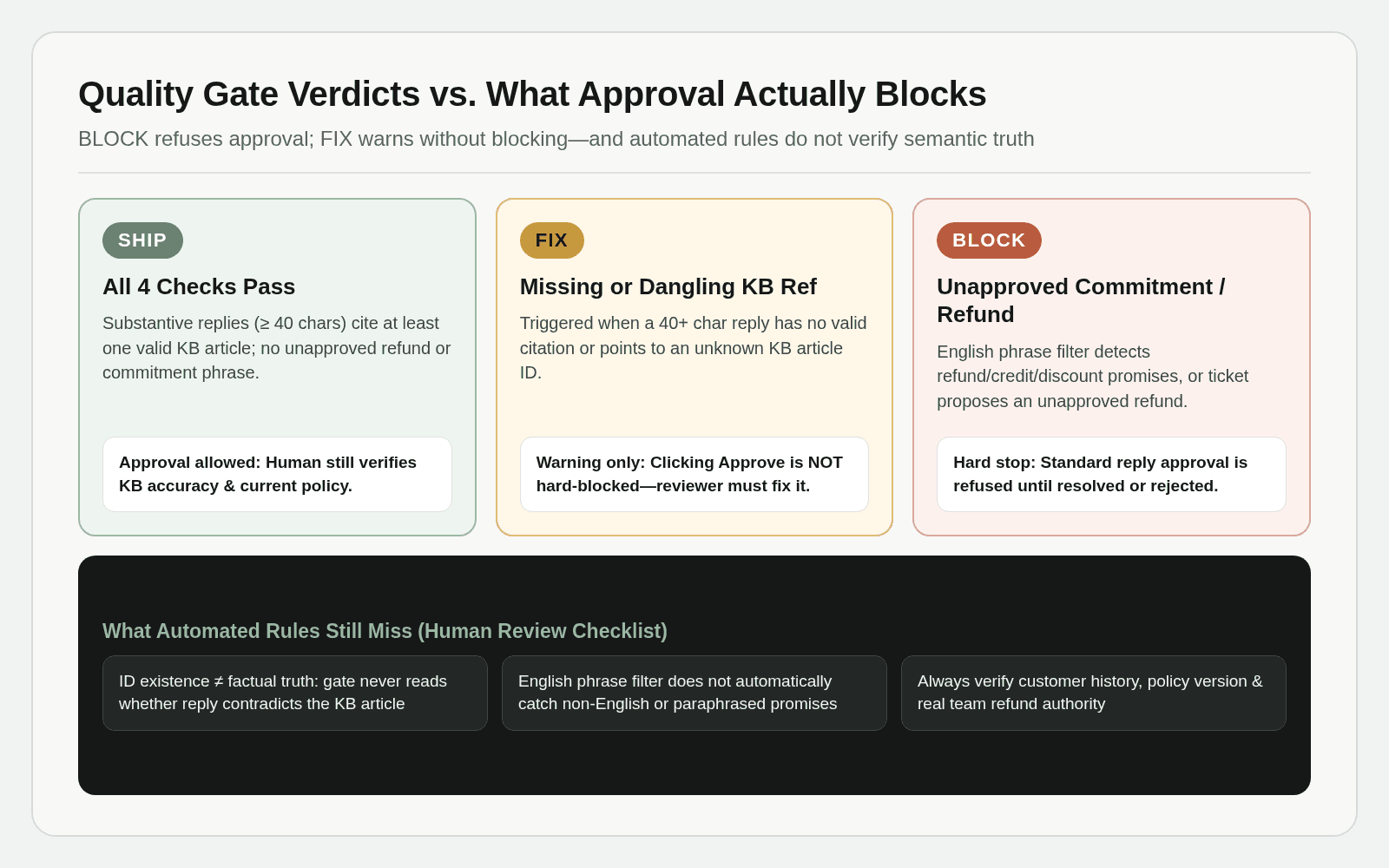
Together, these rules return one of three verdicts: SHIP (all four checks pass), FIX (soft issue such as a missing or dangling KB reference), or BLOCK (hard policy stop on an unapproved commitment or refund).
Why FIX does not hard-block approval—and what humans must still read
Understanding the difference between rule warnings and approval enforcement is essential for safe operations:
- BLOCK stops approval: When a reviewer clicks Approve, the desk re-evaluates the candidate reply as approved. If an unapproved commitment phrase remains on a standard reply, or risk rules block it, approval is refused until the reviewer removes the commitment, changes the action, or clicks Block / Request changes.
- FIX is a warning, not a hard refusal: A ticket flagged FIX (for example, a missing KB citation on a 40+ character draft, or a broken reference ID) does not throw a hard error if someone approves it anyway.
Because the automated gate checks ID existence and English commitment phrases rather than full policy comprehension, human reviewers must read every reply line by line before saving a verdict: verify the customer's channel and account history, confirm which policy version applies, check that the cited KB article actually supports the claim, and confirm any promised credit or refund against real team permissions and workspace risk settings.
Approved is not sent—and neither is delivered
Saving an approval in Busa Support updates only the ticket record in Busabase (status becomes approved with the reviewer's action, comment, and timestamp). The review app itself contains no external channel-sending implementation.
Even running the authorized execution handoff step only re-reads Busabase, re-verifies that the ticket is approved and not blocked, and writes an execution marker (execution status, target, connector, timestamp) onto the ticket—it neither changes the ticket to done nor sends an email or WhatsApp message on its own.
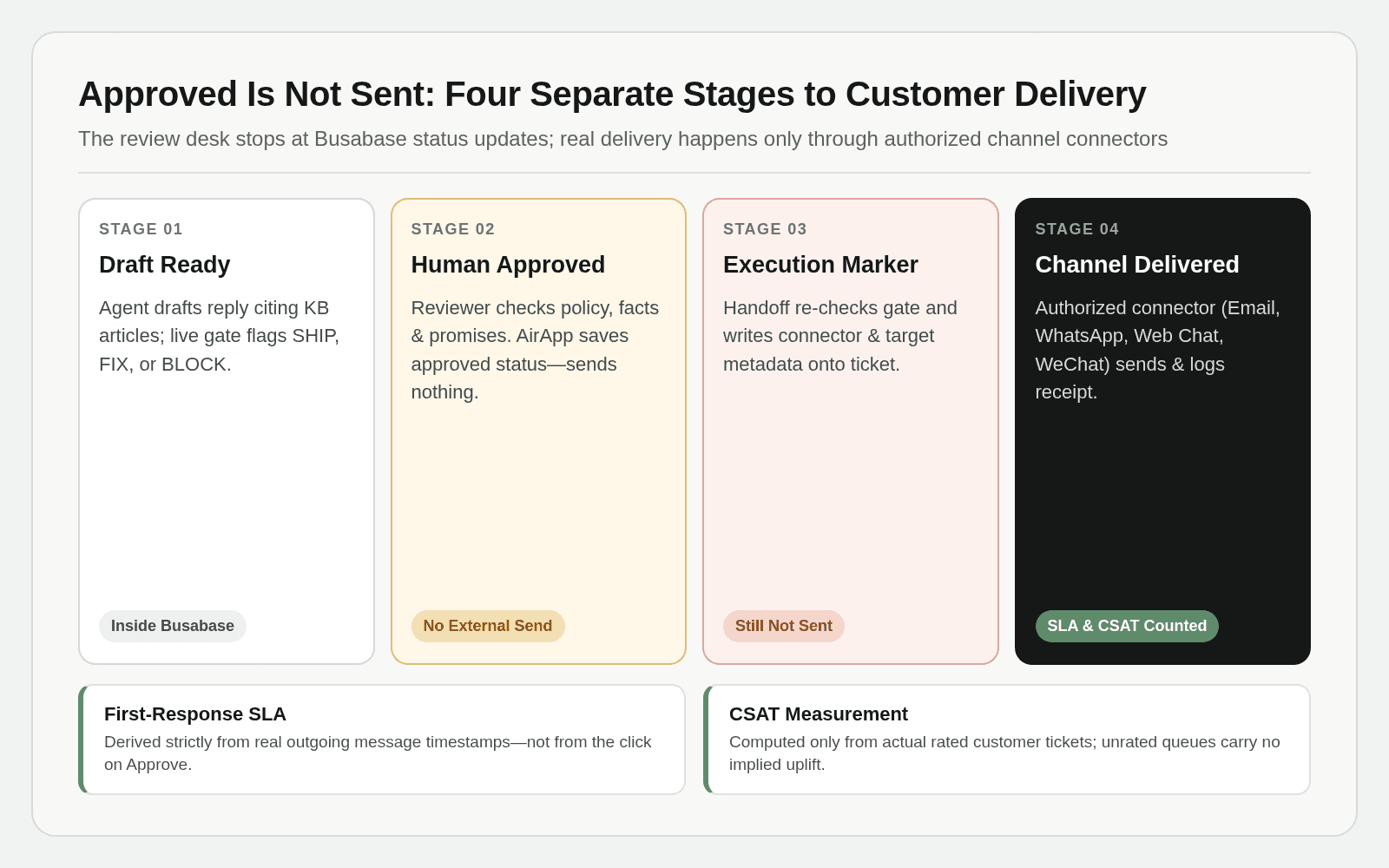
Actual customer delivery requires separately configured and authorized channel connectors (such as an email agent, WhatsApp Business Cloud API, web chat widget, or WeChat Work). Only after that connector sends the message and records a provider receipt plus an outgoing message entry can teams count first response, derive SLA compliance from real outgoing timestamps, or compute CSAT strictly from rated customer responses.
Related workflows in Busabase
- Track invoice and payment mismatches with human review in Busa Audit.
- Keep contract notice deadlines visible ahead of renewals in Busa CLM.
- Manage multi-round proposal edits cleanly in the ChangeRequest revision loop, or read ChangeRequests documentation.
- Visit the Busa Support template page to sign in and install it into your target workspace.