Busabase in one picture
A hybrid of Notion and Supabase, built for AI agents
Busabase is an open-source workspace where people and AI agents share the same data. Your team gets what makes Notion easy to live in: pages, tables, and views anyone can open and edit. Your agents get what makes Supabase easy to build on: real records behind an API, MCP, and a CLI. One place, two kinds of reader.
It replaces neither. Notion stays a good home for your team's writing, and Supabase stays a good backend for your app. Busabase is where your agents' work lands, so a person can read it, check it, and build on it.
Why “hybrid” is the useful picture
Put the tools you already know on a line, by who they were shaped for.
One end
Notion
Shaped for people. Pages and blocks read beautifully. A program can work with them through Notion's API, but the shape was designed for someone reading a page.
The middle
Busabase
Shaped for both. Structured records, docs, and files that a person reads like a workspace and an agent reads like a database. The same data, not a copy for each.
The other end
Supabase
Shaped for programs. A Postgres database with auth, storage, and APIs behind your application. Excellent for engineers; not where a teammate goes to read what an agent did.
Without the middle, teams glue the two ends together: the agent writes to a database, someone builds an admin page so people can see it, and someone else copies the important parts into a doc. Busabase is the middle, so the glue goes away.
What you get from each half
The Notion half, for people
- Tables with table, board, gallery, calendar, and Gantt views
- Docs and files next to the data, in folders you organize
- A team knowledge base: Docs, files, and Bases in one tree, with members, roles, and shared permissions
- AirApps on your data that run in the browser, on your machine, in a cloud sandbox, or as a website on your own domain
- Every change kept in history, so you can see who changed what and roll it back
The Supabase half, for agents and code
- Typed fields and records behind an HTTP API, an MCP server, a CLI, and an SDK
- grep: one regex search across files, Doc bodies, records, and agent prompts, returning the line and its context
- Skills you upload once: every connected agent reads the same version, and editing one is a Change Request
- Open source under MIT, and it runs on Postgres
- Run it on your own machine, self-host it inside your network, or use Busabase Cloud
The part neither end has: every change is a Change Request
Notion records what an agent changed after it changed, in the audit log on its Enterprise plan. Supabase's MCP documentation says to connect an agent to a production project only when the task requires production evidence, and then with project scoping and read-only mode. Both are reasonable, and both leave the same question open: when an agent produces something that matters, where does it go so a person can trust it?
Think of it as a pull request for your data. In Busabase, every edit — a record, a Doc, a Skill file, a schema change — is a Change Request. It carries a message, a field-level before-and-after diff, the author, and the key or tool it came through, and it lands in history you can roll back. Merging moves the record forward; nothing is overwritten.
Review is your choice, not a toll on every edit. Writes with write access merge at once and keep their history. Give an agent a proposal-only key and its changes wait in the Inbox for a person to approve or send back.
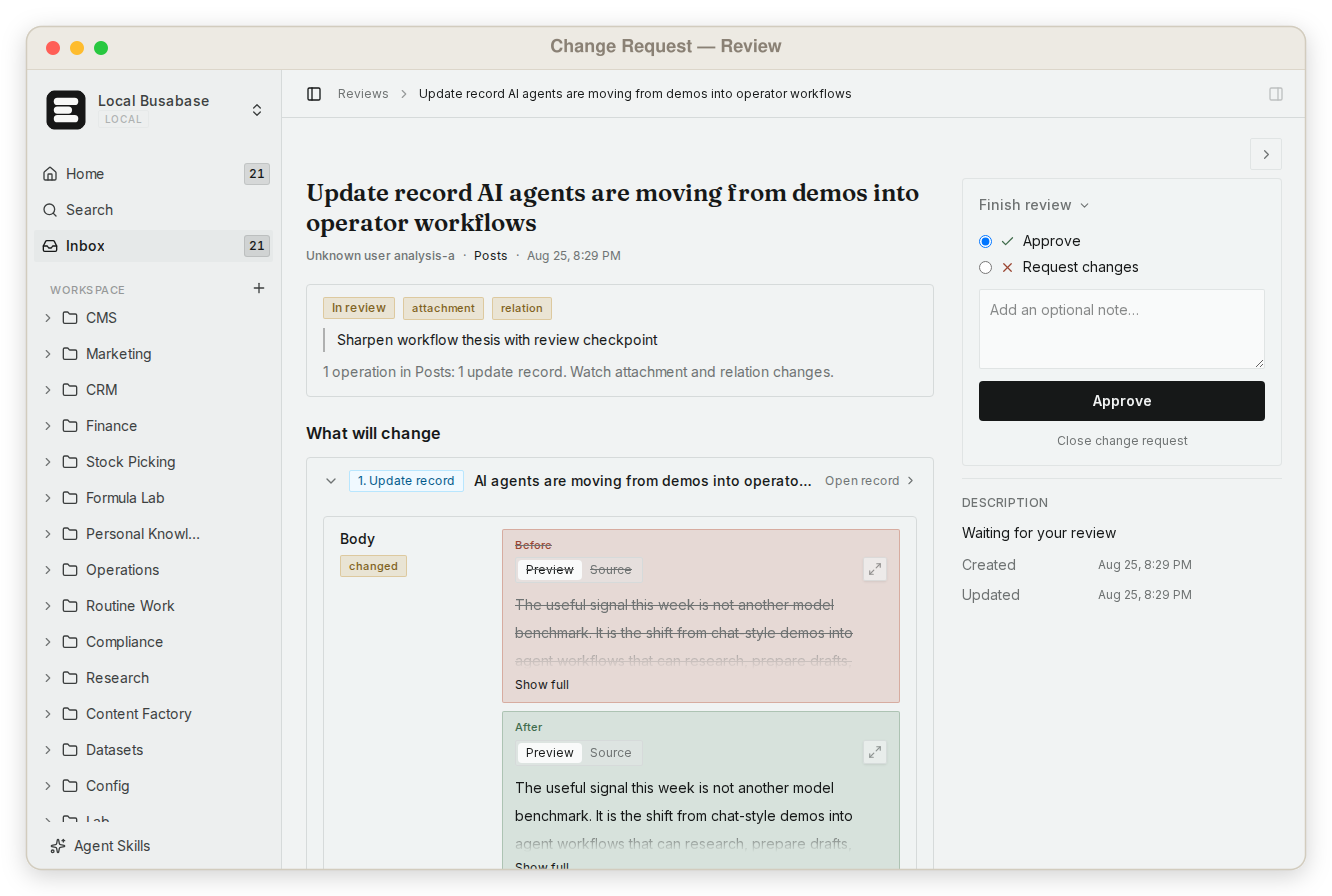
That write path is what turns a workspace into a system of record for AI agents.
Which one for which job
| What you are trying to do | Notion | Supabase | Busabase |
|---|---|---|---|
| Write notes, plans, and a team wiki | Built for it | Not its job | Can, but keep Notion if it works for you |
| Give your app auth, user data, and a backend | Not its job | Built for it | Not its job; your app can run on Supabase |
| Let an agent read and write structured data | Possible, through pages and blocks | Possible; for production, its MCP docs advise project scoping and read-only mode | Built for it, through API, MCP, CLI, or Skills |
| Let a teammate open and edit what an agent produced | Built for it | Needs an admin interface you build | Built for it |
| See what an agent changed, and why | Afterwards, in the Enterprise audit log | Up to you to build | Every write has a message, a diff, and an author |
| Hold an important write until a person checks it | Not available | Not built in | Yes, when you choose: a proposal-only key sends changes to the Inbox |
Notion facts follow our first-hand comparison, verified in September 2026; Supabase facts were re-verified on 13 November 2026 against its MCP documentation: Busabase vs Notion and Busabase vs Supabase.
Use them together
Most teams do not pick one. Keep Notion for your team's writing. Keep Supabase behind your product. Point your agents at Busabase, so what they produce is something a person can open, check, and build on.
The apps an agent builds from that data can still run on Supabase. Supabase gives your agent's app a backend; Busabase gives the agent itself a workspace.
Frequently asked questions
Is Busabase a Notion alternative?
Is Busabase a Supabase alternative, or a backend for my app?
Do I have to approve every change an agent makes?
Can I run it myself?
Which agents can use it?
Next step
The quickest way to see the hybrid is to connect an agent you already use, ask it to write something, and open the result as a page.
Busabase vs Notion · Busabase vs Supabase · What makes a store a system of record for AI agents · How Change Requests work