Busa Local Model Lab template: test a local LoRA adapter against a locked baseline
Use Busa Local Model Lab to separate Busabase dataset curation and promotion lineage from Apple Silicon MLX runs before shipping an adapter.
Watching training loss drop on an Apple Silicon Mac is rarely the hard part of local fine-tuning. The trouble starts a week later when someone asks a simple question: did that LoRA adapter actually beat the untouched base model on strict structured output, or did duplicate examples leak into the test set while nobody kept track of which dataset snapshot produced which weights?
Busa Local Model Lab is an official, MIT-licensed Busabase template built to enforce that discipline before any local model weights move toward production. It turns Busabase into the control and data plane for human-curated examples, immutable snapshots, run contracts, and promotion lineage, while keeping heavy mlx-lm QLoRA compute on a trusted Apple Silicon worker.
Why Busabase splits the control plane from the Mac worker
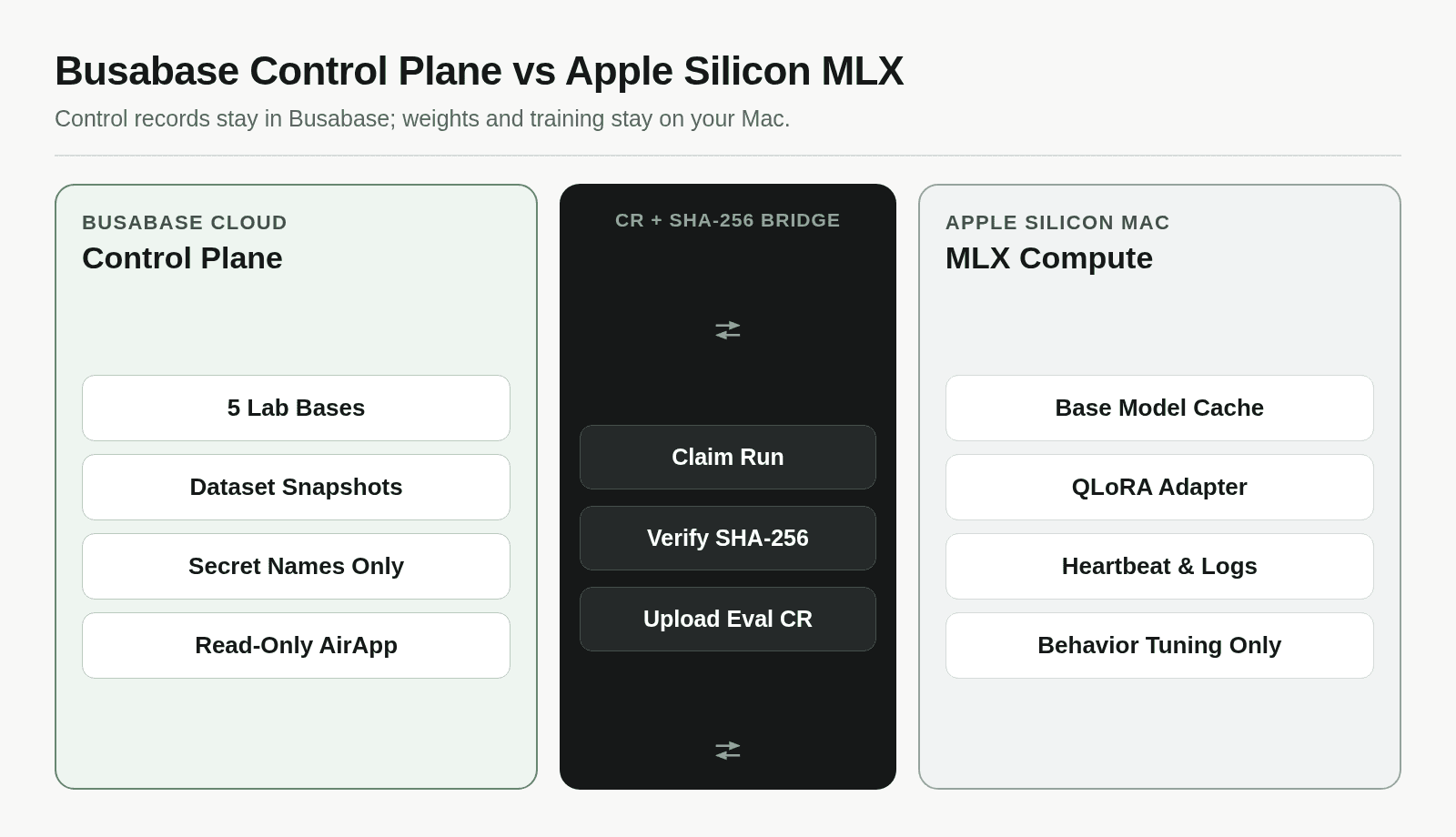
Most local fine-tuning setups fail operationally because training scripts, raw prompts, evaluation splits, and promotion decisions all live in the same mutable folder on one laptop. When you install Busa Local Model Lab, it separates responsibilities cleanly across two planes:
- Busabase control & data plane: Five structured Bases (
Training Examples,Training Runs,Evaluations,Model Registry, andSettings), aModel Lab FilesDrive folder for immutable snapshots and uploaded artifacts, aLocal Model LabAirApp for reviewing datasets, runs, and verdicts, and Vault entries storing named credential requirements only (secret values never enter the browser). - Trusted Apple Silicon worker: The local Mac runtime running
mlx-lm[train]==0.31.3(pinned alongsidedatasets==5.0.1) against locally cached foundation models such as the default smoke modelmlx-community/Qwen3-0.6B-4bit.
Two boundaries keep that split safe. First, the AirApp never launches MLX, never reads local model files, and never calls Mac localhost—it only inspects Busabase records and verified artifacts through ChangeRequests. Second, the local foundation checkpoint cache stays disposable on the Mac and is never uploaded to Drive; only the lightweight LoRA adapter, evaluation report, and model card travel back as deliverables with source-attachment evidence.
It also sets clear expectations on what fine-tuning is for: QLoRA here tunes model behavior and output formatting (such as generating a valid structured specification), never rewriting foundation weights from scratch, running cloud training, or replacing retrieval-augmented generation when an agent needs current facts.
Curating examples and preventing split leakage before training
Bad splits invalidate an evaluation long before the first gradient step. If two rewordings of the same ticket sit across train.jsonl and test.jsonl, an adapter looks accurate simply because it memorized its neighbor.
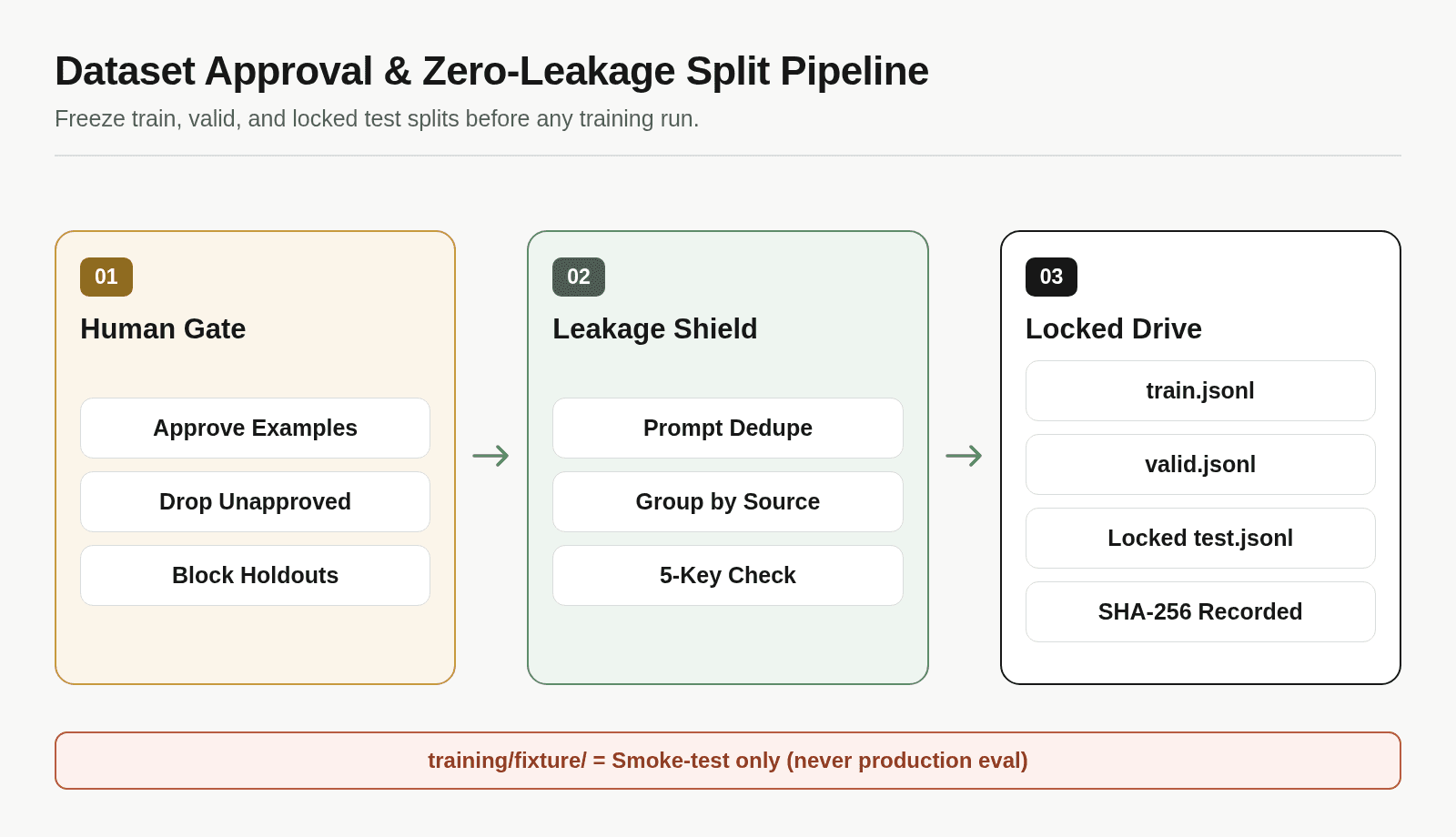
Busa Local Model Lab stops leakage across three sequential gates:
- Individual example review: Every row in
Training Examplestracks itsprompt,ideal-response,source,content-hash, reviewer note, and timestamp. Reviewers mark rows individually asapprove,request_changes, orblock—and only approved examples may enter an export. - Deduplication and group-aware splitting: Before splitting into
train.jsonl,valid.jsonl, and a lockedtest.jsonl, related examples sharing the same source, author, customer, document, or time window are kept in the same group so near-duplicates never straddle train and test. The includedmlx_smoke.pyvalidator also rejects any split set with duplicate prompts or invalid target JSON. - Immutable Drive snapshots: Approved splits are written once to Drive alongside per-file SHA-256 checksums and an aggregate
dataset-hash. Workers never train directly against a mutable live Base query, and snapshots are never overwritten—any edit requires exporting a new snapshot and starting a fresh run.
Keeping dataset snapshots distinct from active memory or retrieval stores also reflects the broader architectural line between agent memory, knowledge bases, and systems of record: training provenance stays frozen so every downstream score can be audited months later.
Evaluating the untouched baseline on the exact same test set
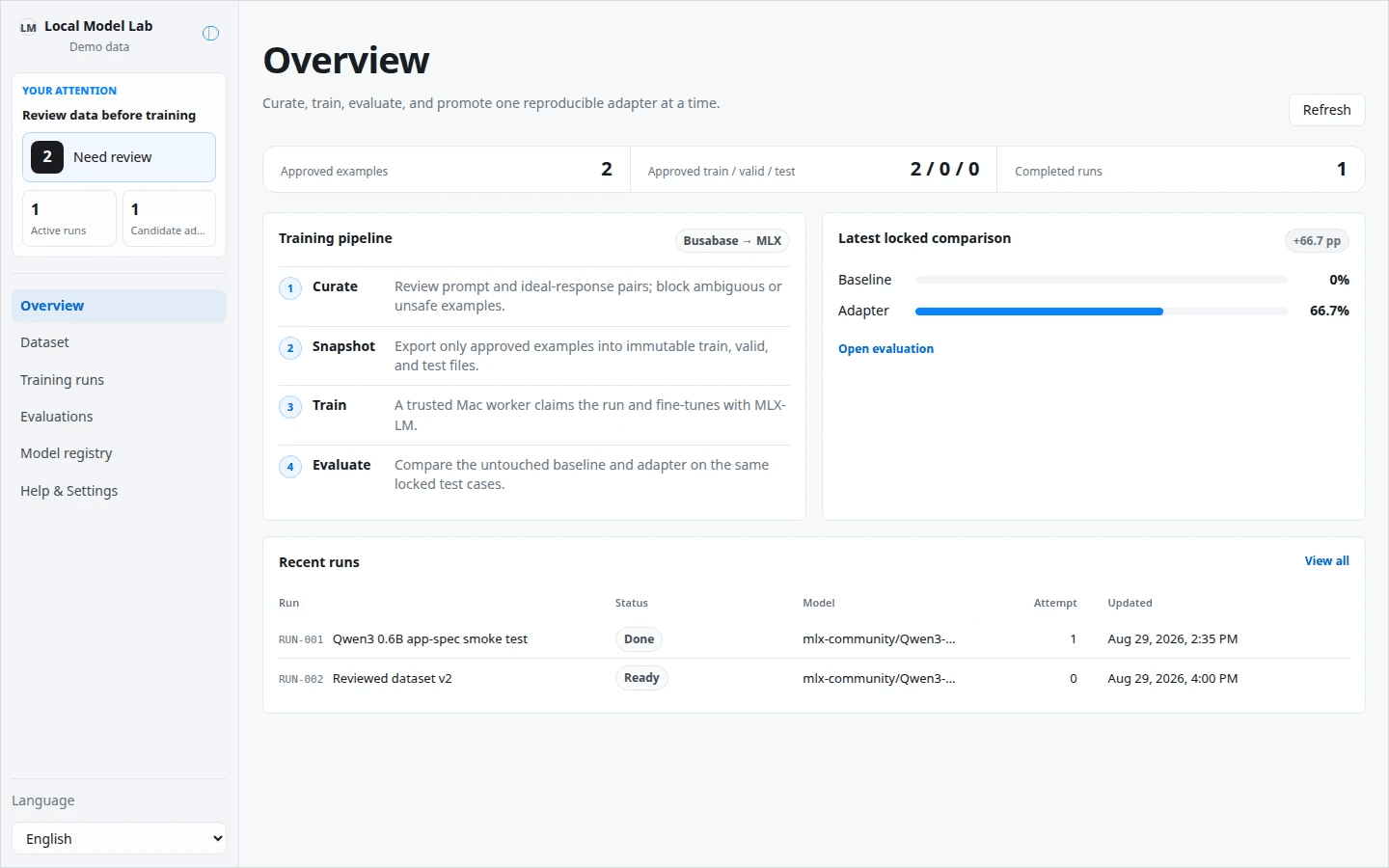
A training run starts with an atomic claim on a ready row in Training Runs (ready -> in_progress -> done | failed | blocked), updating attempt and heartbeat-at while keeping sanitized error logs if anything fails. Every run pins the exact base model, base-revision, MLX-LM version, and hyperparameter config (num-layers, learning rate, sequence length, iterations).
Crucially, the worker evaluates the untouched base model first on the locked test.jsonl using identical prompt formatting and deterministic decoding settings (max_tokens=180), runs QLoRA training to produce the LoRA adapter, and then evaluates the adapter on the exact same test.jsonl and decoding configuration.
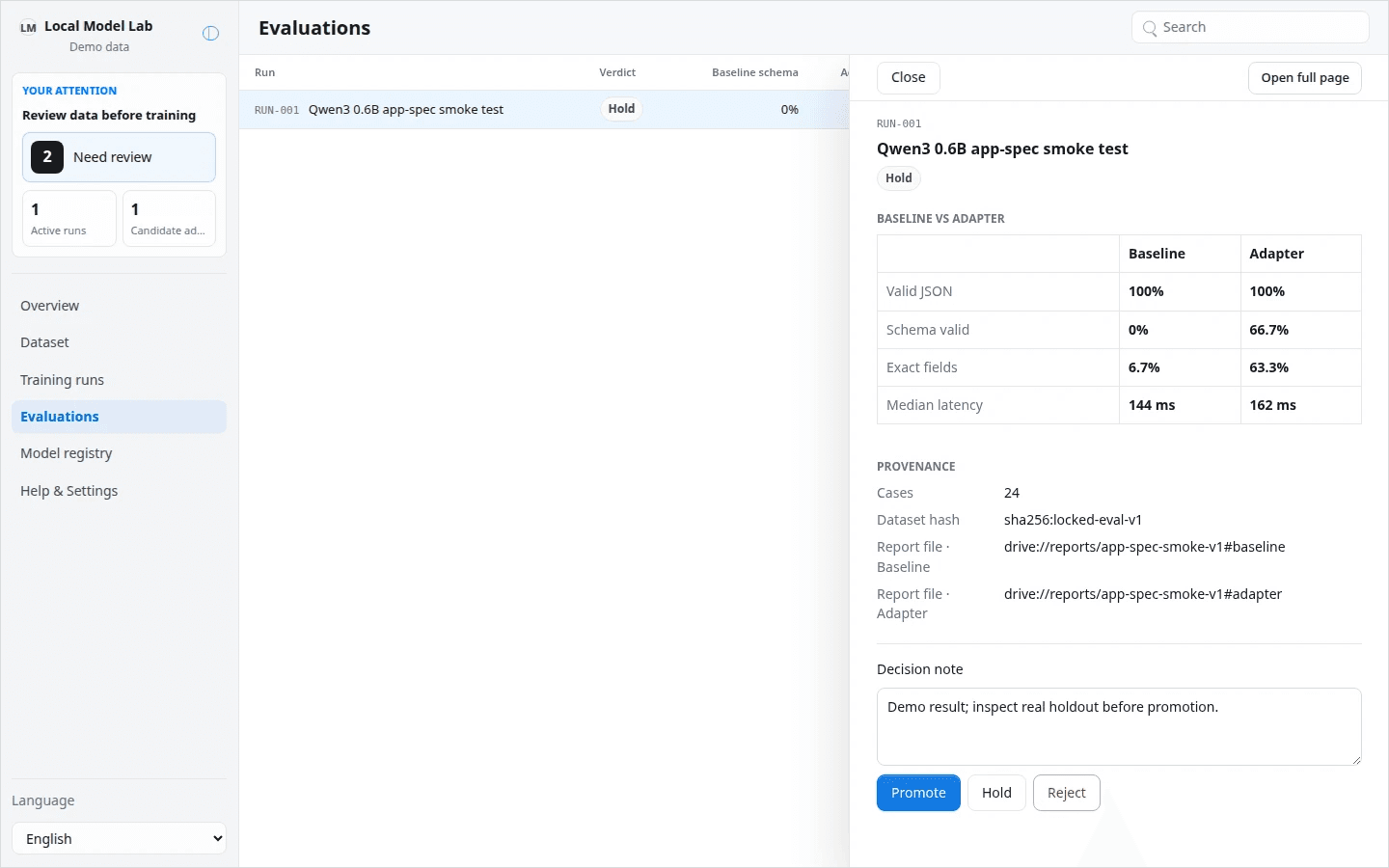
In the template's bundled app_spec extraction task (mlx_smoke.py), both baseline and adapter are scored across four concrete metrics stored in the Evaluations Base:
json_valid_pct: Share of completions that parse cleanly as JSON.schema_valid_pct: Share matching the exact five-keyapp_speccontract (name,category,risk,surface, andapp_typeagainst allowed enum sets).exact_field_pct: Field-by-field exact match rate across every locked test case.median_latency_ms: Median inference latency per test prompt so accuracy gains are weighed against serving speed.
One rule sits at the center of the workflow: training loss is diagnostic only and never a promotion metric. A falling loss curve tells you optimization moved on the training split; only the locked holdout comparison tells you whether the adapter actually improved JSON validity, schema adherence, or exact-field accuracy without breaking latency.
Artifact verification and human-gated promotion
Even after MLX exits with status zero, the worker cannot mark a run done until the adapter file, evaluation report, and model card are uploaded to Busabase Drive and their upload references verify cleanly. If an upload fails, the run settles as failed or blocked with recoverable local references rather than leaving a false green checkmark.
Promotion itself stays explicitly human. Reviewing the side-by-side rows in Evaluations and the Local Model Lab AirApp, a human reviewer records one of three verdicts—promote, hold, or reject—together with a decision-note:
- Promote writes a lineage-complete record into
Model Registrytying togetherbase-model,base-revision,dataset-hash,training-run-id, andadapter-file. Importantly, promoting a candidate does not silently retire the prioractivemodel in production; retirement remains a deliberate operator action. - Hold preserves the run, artifacts, and scores while flagging missing holdout evidence.
- Reject blocks the adapter on schema regression, split leakage, or latency cost while leaving the current production model untouched.
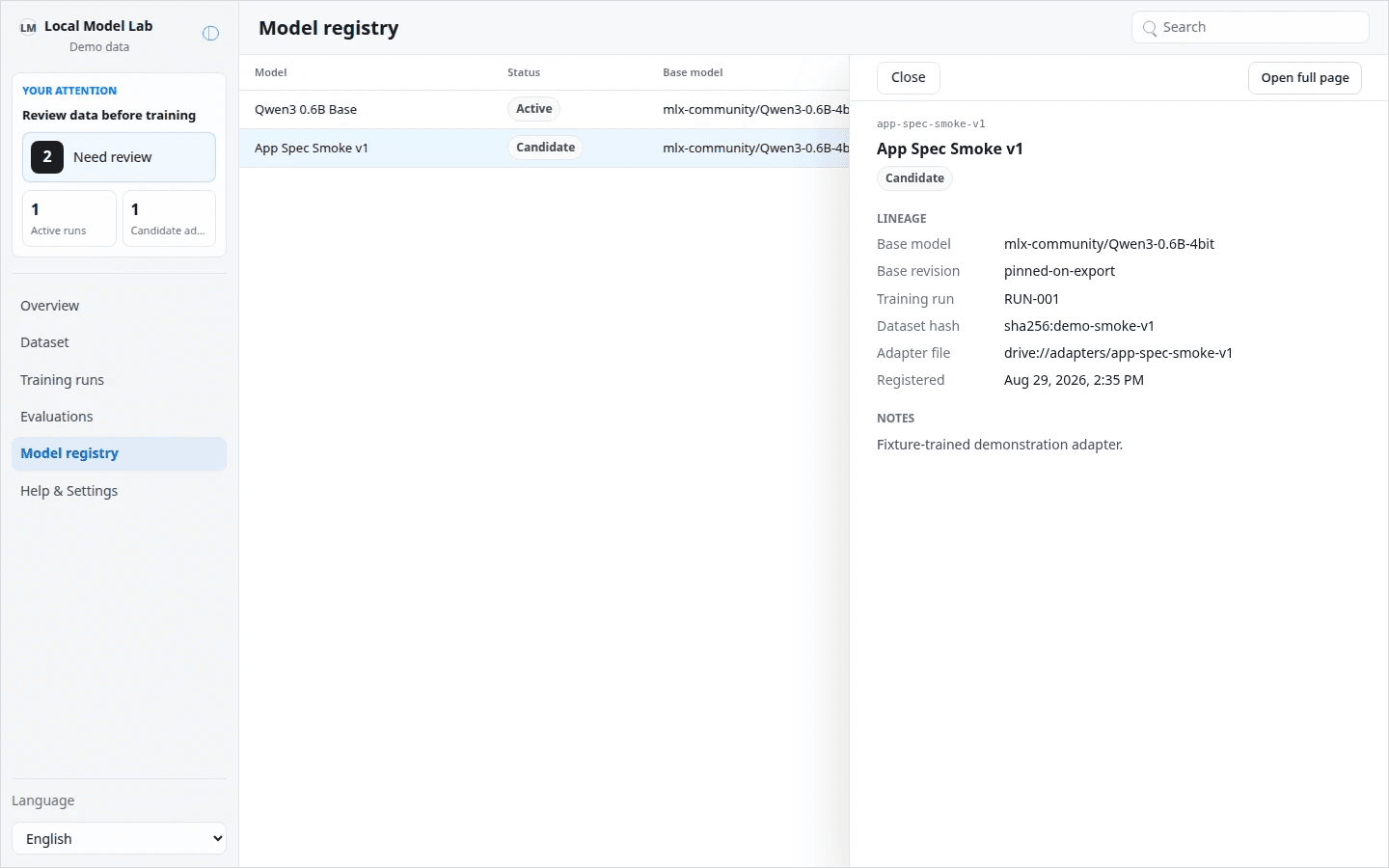
Teams should also note a clear boundary built into the repository itself: the bundled training/fixture/ dataset and the AirApp's ?demo=1 preview mode exist strictly to verify the local workflow mechanics and interface layout—never as a substitute for a human-reviewed production dataset or a live Apple Silicon hardware benchmark. For teams governing local compute and secret boundaries in tandem, see how sovereign AI deployments and Vault runtime secret boundaries enforce the same separation, or explore how structured feedback feeds self-improving agent workflows.
Running the workflow through reviewed proposals
Once Busa Local Model Lab is installed in a Busabase workspace, operators can drive dataset audits and evaluation reviews with prompts like these:
Audit Training Examples awaiting review: list any rows with missing sources,
duplicate prompts, or ideal responses that fail the 5-key app_spec schema,
and propose approve or request_changes updates for my review.
Compare the latest baseline and adapter rows in Evaluations for run [run-id]:
summarize json_valid_pct, schema_valid_pct, exact_field_pct, and median latency,
and highlight any category or risk-tier regressions before I enter a verdict.
Draft a Model Registry ChangeRequest for [adapter-id] linking its exact
base-revision, dataset-hash, training-run-id, and Drive adapter reference,
without changing the status of the current active model.
Frequently asked questions
Does Busa Local Model Lab trigger Apple Silicon training directly from the browser?
No. By design, the Local Model Lab AirApp never launches mlx-lm, reads local checkpoints, or calls Mac localhost. Busabase holds the reviewed dataset snapshot and ready run contract; a trusted local Mac worker claims the run, trains locally, uploads artifacts, and writes status back for human review.
Why does the workflow evaluate the base model during the same run instead of reusing an old score?
Evaluating the untouched base model first inside the same run guarantees identical base-revision, identical prompt template formatting, identical deterministic decoding settings, and the exact same locked test.jsonl snapshot—eliminating silent drift from software or prompt updates.
Can Busa Local Model Lab inject new company documents into a model instead of using RAG?
No. QLoRA fine-tuning in this template adapts model behavior and structured formatting (such as consistent JSON schema output). For up-to-date company knowledge or citations, pair your workspace with retrieval or structured Bases rather than baking mutable facts into weights.
Lock your baseline before promoting the next adapter
Inspect Busa Local Model Lab to review all five Bases, the mlx_smoke.py evaluation contract, and the two-plane architecture, and read how Busabase ChangeRequests keep dataset approvals and model promotion decisions auditable from start to finish.