Busa PE Diligence template: keep unverified claims out of your IC memo
Use Busa PE Diligence to link requests, primary filings, interview claims, and severity-ranked red flags so only verified evidence enters the IC memo.
Every private equity deal team knows the pressure of the final two weeks before Investment Committee. The management presentation sounds sharp, an expert call backs up the growth story, and a teaser metric slips into the working memo as a bullet point. By the time the committee meets, nobody in the room can immediately tell which numbers came from audited statements and which ones originated on a seller slide.
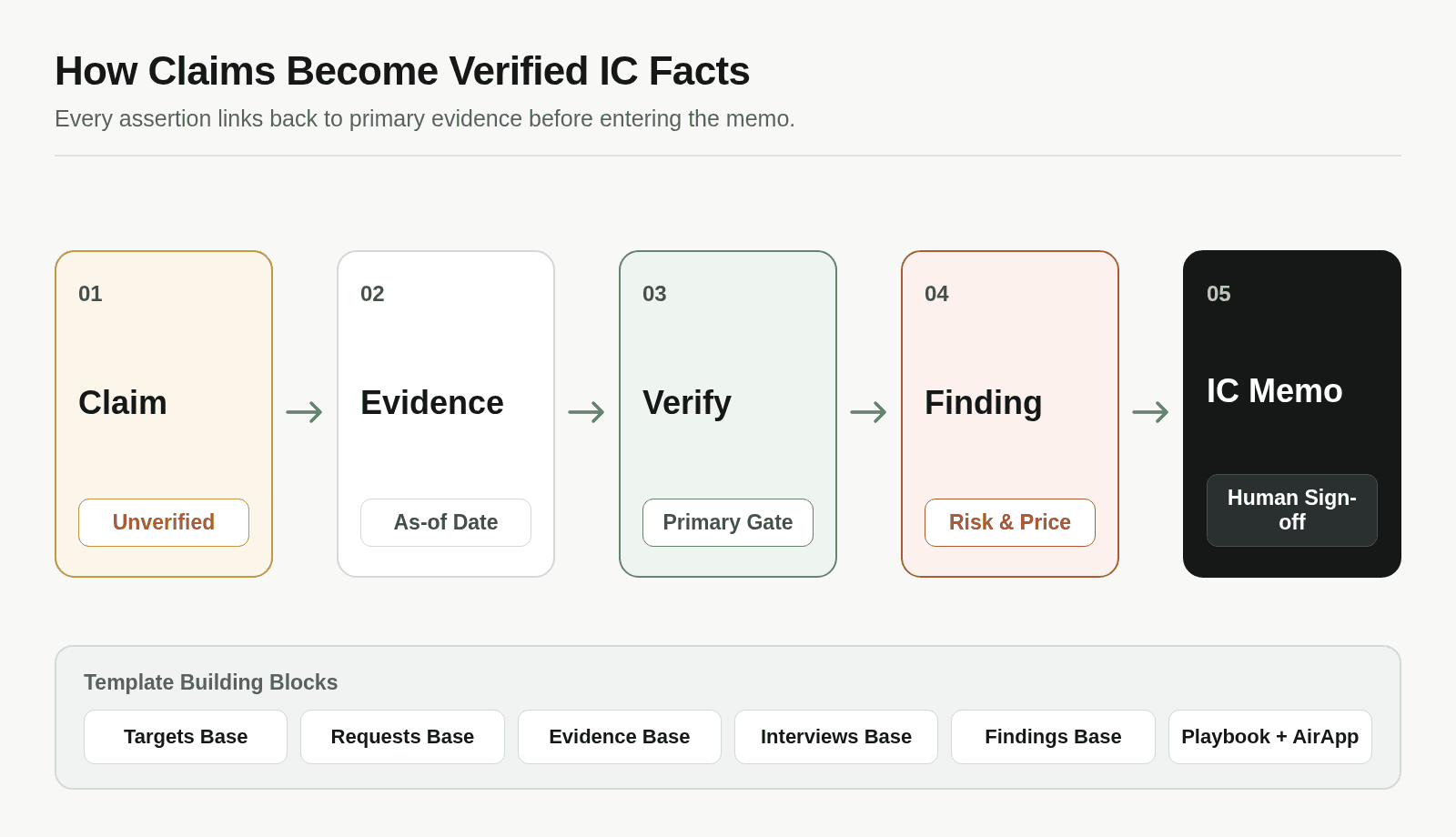
Busa PE Diligence is an official, MIT-licensed Busabase template built to stop that drift before the memo reaches the committee table. It replaces scattered spreadsheets and untracked chat notes with a linked workspace—five structured Bases, one standard playbook doc, and a read-only cockpit—where every statement moves through an explicit chain: claim, evidence, verification, finding, and committee decision.
What Busa PE Diligence puts in your workspace
When you install Busa PE Diligence into a Busabase Folder, the template creates seven connected resources designed around human-reviewed deal judgment:
- Targets: One row per company under evaluation, tracking sector, geography, stage (
ScreeningthroughClosedorPassed), deal type, stake percentage, enterprise value, financial snapshot, target IC date, and next action. - Diligence Requests: A request tracker spanning nine workstreams—Financial & QoE, Commercial, Legal, Tax, Technology, Operations, HR, ESG, and Insurance—with criticality (
Critical,Important,Nice to have), owner, due date, and receipt status. - Evidence Register: The central verification log recording source type,
source-date,as-of-date, summary, link, and verification verdict. - Interviews & Site Visits: Notes from management sessions, expert calls, customer references, and site visits, capturing
key-claims, consistency, credibility, and follow-up tasks. - Findings & Red Flags: Risks and contradictions linked back to specific
Evidence Registerrows, ranked by severity and assigned an owner and resolve-by date. - IC Memo and Diligence Playbook: The shared rulebook specifying verification standards, severity tiers, and the seven-section IC memo skeleton.
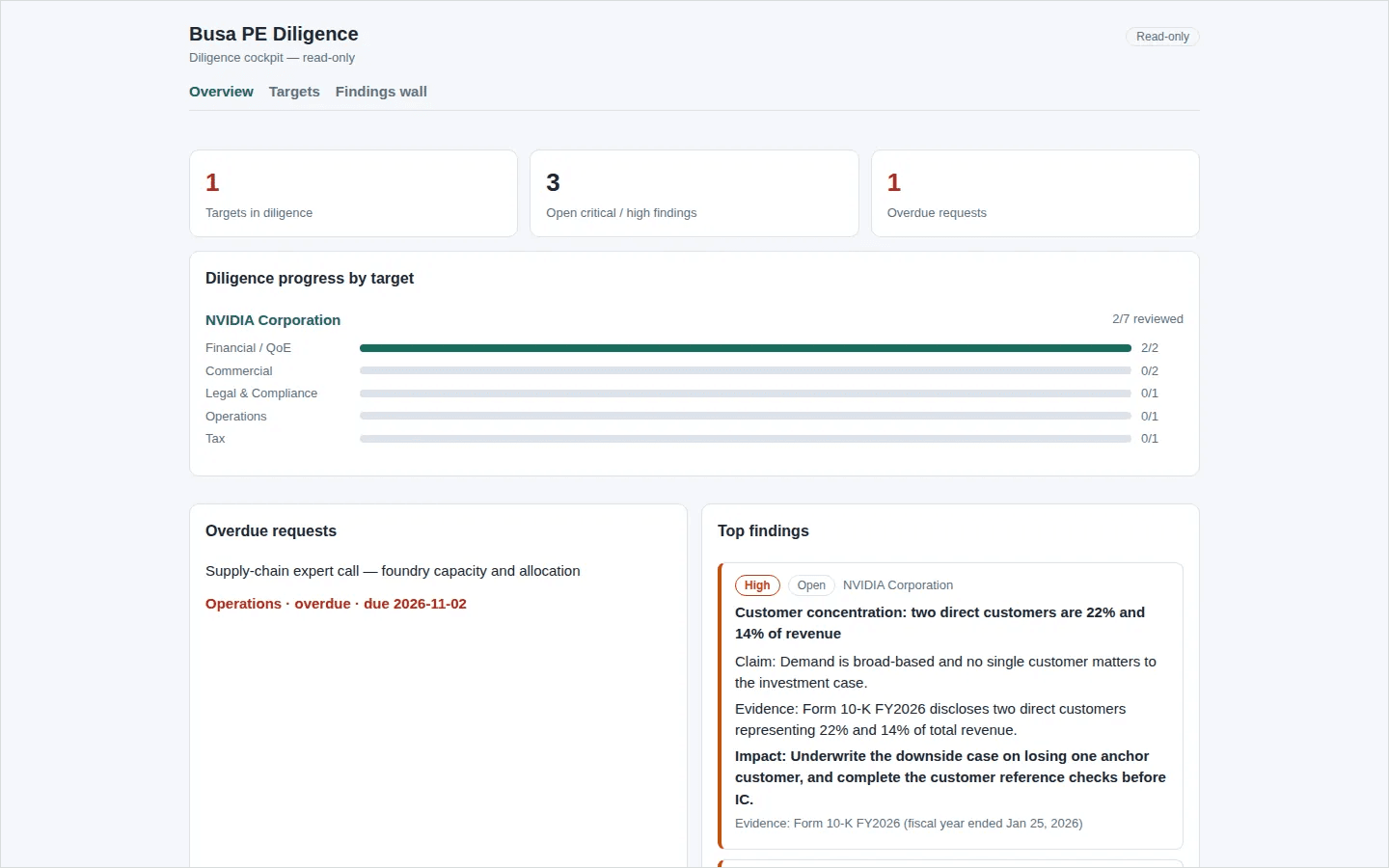
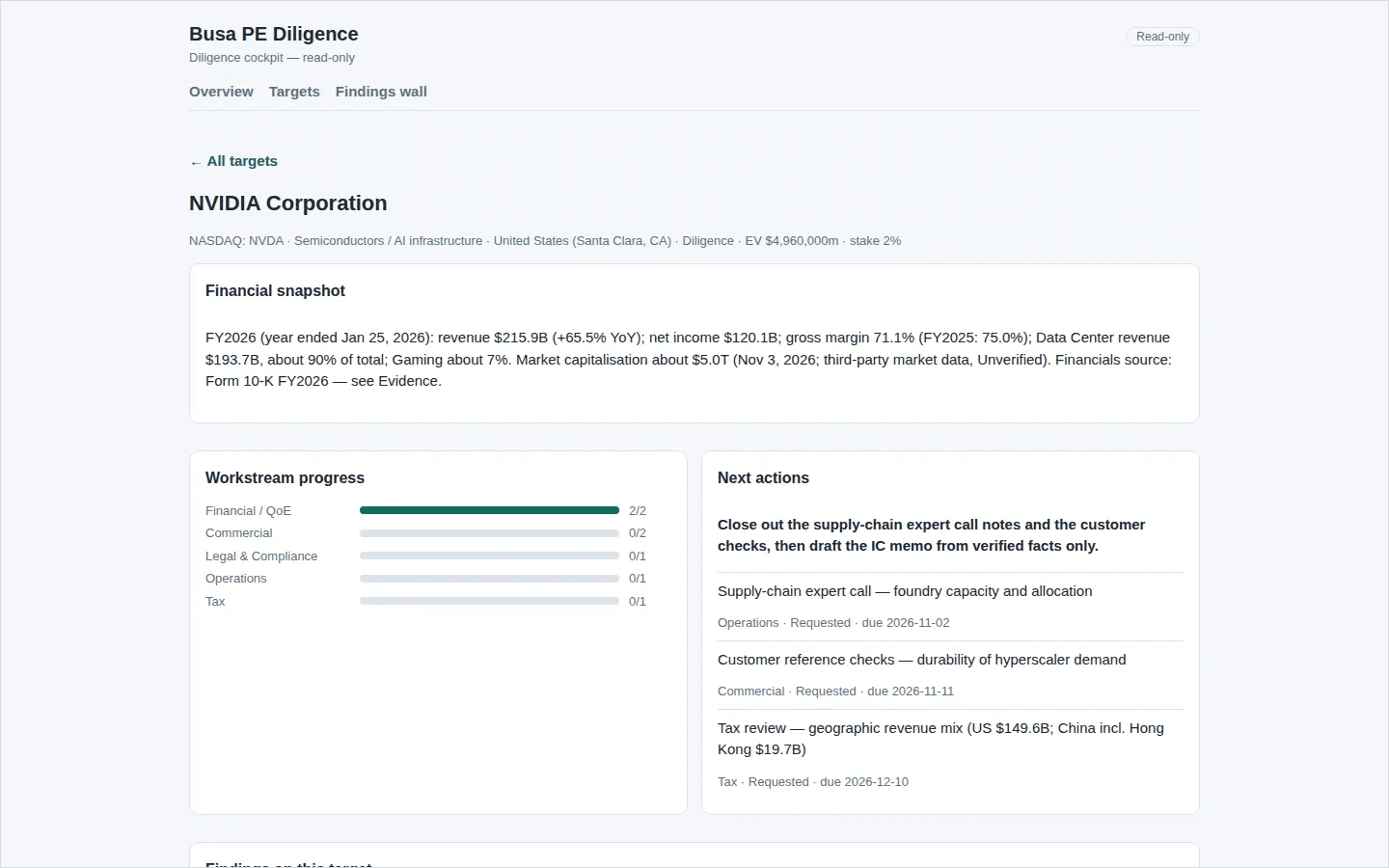
- Diligence Cockpit: A read-only AirApp displaying pipeline status, open critical requests, findings walls, and target-level verification posture.
Notice that the cockpit is deliberately read-only. Rather than building another manual data-entry portal, deal teams inspect posture in the cockpit and work with an AI agent—or directly inside the Bases—through auditable ChangeRequests. Because proposals wait in review until a human deal lead approves them, an agent can organize dozens of filings and interview transcripts overnight without silently rewriting a single deal record.
Why transcripts never prove a claim on their own
Most diligence mistakes happen in the gray zone between hearing a convincing answer and proving it on paper. In Busa PE Diligence, every claim enters the Evidence Register marked Unverified by default. Two date fields keep context intact: source-date records when a filing or report was published, while as-of-date marks when the facts were checked—preventing last quarter's press release or an outdated market-cap snapshot from masquerading as today's baseline.
From there, the template enforces a strict split between primary sources and what someone said:
- Primary filings and audited documents (such as Form 10-K filings, audited financial statements, tax returns, or signed customer contracts) can promote a claim to
Verified—provided the exact wording and numbers match the record. - Interview and expert transcripts can only verify that the speaker made the statement. Even a credible CFO call leaves the underlying operational or financial claim marked
Not yet testeduntil a primary document confirms it. - Contradicted claims are never quietly deleted from the draft. When primary evidence disproves a seller or management assertion, the row is marked
Contradictedand linked directly to a new item in Findings & Red Flags.
This mirrors the broader Busabase pattern for deliverables backed by source-attachment evidence: when an executive asks where a number came from, the answer points to a committed record and an attached source rather than a forgotten chat thread.
Ranking findings by deal consequence, not surprise
Another common failure mode in pre-IC memos is treating every unexpected quirk as equally urgent while burying price-moving risks inside long appendices. Busa PE Diligence prevents free-floating speculation by enforcing a hard rule: every finding must link to an Evidence Register row. If an analyst has a hunch without underlying evidence, it belongs in Diligence Requests as an open test or in the memo's Unverified section—never on the findings wall.
Severity follows the consequence to the deal, not how surprising the discovery felt:
- Critical: Breaks the investment thesis, exposes a material price error, or introduces an unquantified liability. If it cannot be mitigated through deal structure, it is flagged as a
Deal-breaker. - High: Changes valuation, price mechanics, or contract protections—requiring earn-outs, specific warranties, escrows, conditions precedent, or lower underwriting assumptions.
- Medium: Adjusts model inputs such as margin trajectory, capex, or working capital without altering deal structure.
- Low: Worth monitoring post-close, logged with a named owner and a
resolve-bydate.
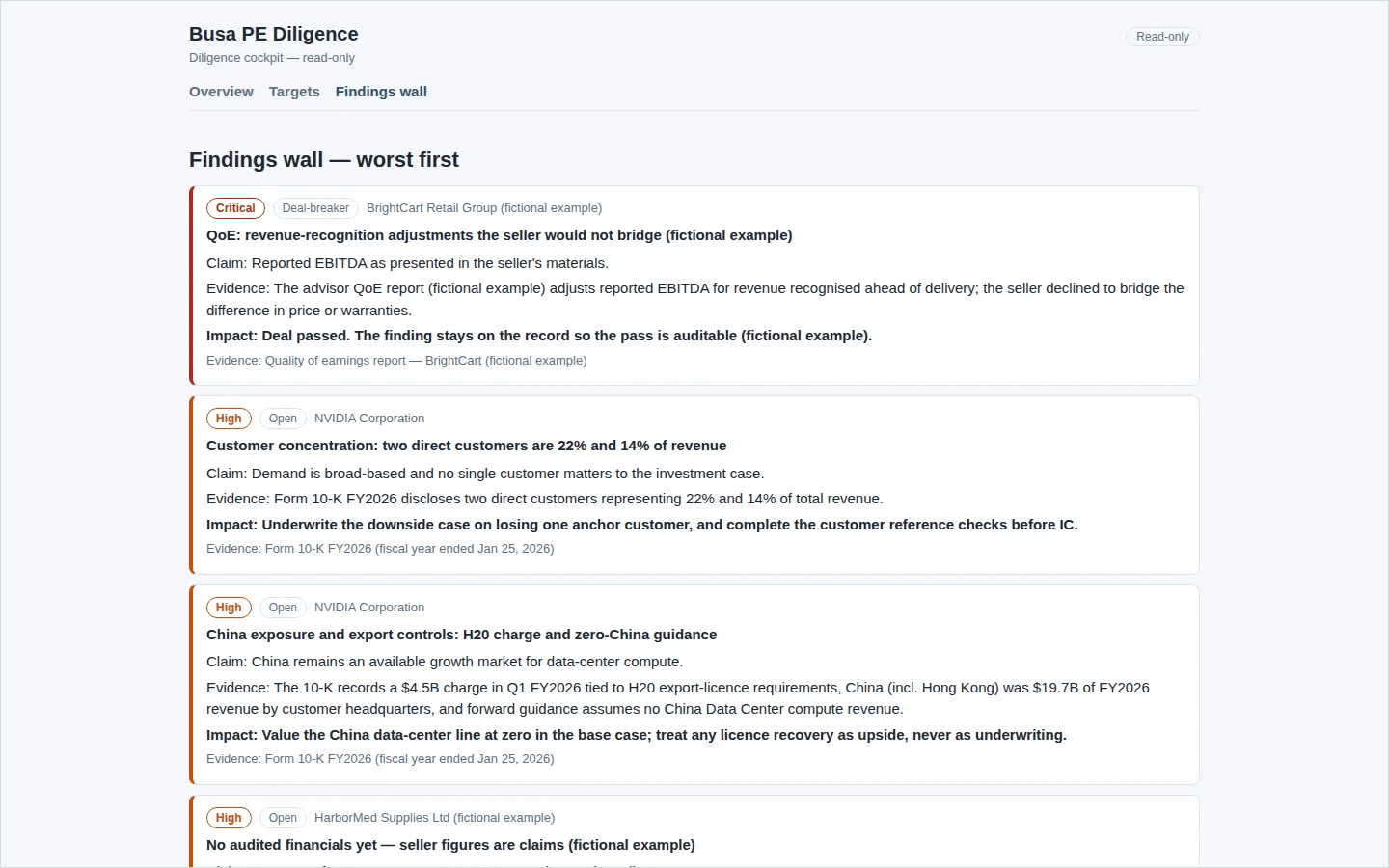
Even when a deal team walks away and sets a target's stage to Passed, the workspace keeps the record and its findings intact. The reason the firm passed becomes institutional memory for the next sector review—an example of treating a workspace as a durable system of record rather than a disposable folder.
Keeping the seven-section IC memo honest
When it is time to assemble the Investment Committee memo, the IC Memo and Diligence Playbook locks in seven required sections:
- Investment thesis (with footnotes to
Evidenceor explicit unverified flags) - Quality of Earnings (QoE) conclusions (reported vs. adjusted earnings, cash conversion, and net debt)
- Verified facts (exclusively rows marked
Verifiedfrom primary sources) - Red flags (open findings ordered by severity, impact, and named owner)
- Unverified (every unproven claim, missing workstream, and waived
Criticalrequest) - Valuation and deal-structure protections (price basis paired with warranties, escrows, earn-outs, or closing conditions)
- Exit path (likely buyer universe and conditions required for exit)
If a critical QoE or legal workstream was waived to hit an exclusivity deadline, Section 5 forces that gap onto the page instead of leaving blank rows that look finished. Just as important, the template establishes clear operating boundaries for any AI agent assisting the deal team: never contact the target, management, customers, or external parties; never present seller or teaser numbers as audited; write "not yet known" rather than guessing a missing figure; never issue an investment recommendation; and always present the memo draft to a human reviewer before submitting a ChangeRequest.
Teams can inspect these boundaries in action using the template's bundled reference dataset without risking live deal data. It includes a real public-source worked example for NVIDIA Corporation (anchored to its FY2026 Form 10-K, where a third-party market-cap snapshot is intentionally left Unverified to demonstrate source discipline) alongside two clearly labeled fictional targets, BrightCart Retail Group and HarborMed Supplies Ltd. As always when adapting a shared workspace, test how your team wants to structure requests and approvals rather than assuming an unexecuted template fits every fund workflow out of the box—a pattern we also recommend in our self-improving agent workflow guide.
Putting the template to work in chat
Once you install Busa PE Diligence from the Busabase template library, a deal lead or connected agent can start working through concrete prompts directly against the Folder:
Log a new Target for [Company] at Screening stage, and create initial Critical
Diligence Requests across Financial & QoE, Commercial, Legal, and Tax.
Audit our Evidence Register for [Company]: list every claim still marked
Unverified or Contradicted, check whether any interview claims lack primary
filings, and open Findings where evidence disproves a management assertion.
Draft the 7-section IC memo for [Company] using only Verified evidence in the
facts section, list all waived Critical requests under Unverified, and show me
the draft before opening a ChangeRequest.
Each step produces structured records waiting cleanly in review rather than unverified paragraphs buried in slides. For teams building similar evidence-first approval loops in other domains, see how sovereign AI workspaces and procurement scorecard evidence gates apply the same verification model.
Frequently asked questions
Does Busa PE Diligence let an AI agent reach out to a target company or pull data room files automatically?
No. The template's operating rules explicitly forbid contacting the target company, management team, customers, or any external party. Agents work only from filings, notes, and transcripts provided inside the workspace and propose structured updates through human-reviewed ChangeRequests.
What happens if an expert interview contradicts a figure in the seller's teaser?
The interview note is logged in Interviews & Site Visits and helps direct verification, while the teaser figure enters Evidence Register as Unverified. Once primary filings or audited records settle the discrepancy, the conflicting claim is marked Contradicted and linked to a new row in Findings & Red Flags with its deal impact and owner.
Can a deal team install the template directly into an existing Busabase workspace?
Yes. Open the Busa PE Diligence template page while signed in to inspect its five Bases, playbook doc, and read-only Diligence Cockpit, then install the Folder into your workspace and configure review permissions before inviting deal analysts.
Start with verified records before the next IC
Inspect Busa PE Diligence to see the full five-Base schema, playbook rules, and worked example, and review how Busabase ChangeRequests keep every agent-drafted diligence update in human review until your deal lead approves it.